Aircraft Digital Electronics & Computer SystemsSelf-study AE2.021 · USTH
Tiếng Việt
🎨

← Home

MODULE 06

Electronic Displays and Flight Deck Information Systems

Tooley ch.1, ch.11, ch.15 (sections 15.1 to 15.3) · Floyd ch.4 (Applied Logic) and ch.6 (7-segment) · Lecture "Electronic displays" (36 slides)

📚 Chapter mapping: 9 lectures ↔ textbook chapters

Tooley: Ch.1 Introduction (p.1-24): flight instruments, EFIS, ECAM/EICAS, cockpit layouts + Ch.11 Displays (p.178-196): CRT, LED/7-segment, LCD + Ch.15 Avionic systems, sections 15.1 ACARS, 15.2 EFIS, 15.3 EICAS/ECAM (p.238-250); 53 MCQs from Ch.1, 11, 15

Floyd: Ch.4 Applied Logic: Seven-Segment Display (p.244-249; problems 62-71, p.256) + Ch.6 section 6-5 decoder/driver 74HC47 and zero suppression (p.338-340) + section 6-8 7-segment multiplexing (p.353). Floyd has NO content on EFIS/ECAM/ACARS or CRT/LCD technology beyond the 7-segment level: most of this module relies on Tooley and the lecture slides.

This module has its own lecture deck (36 infographic slides, each read directly). Tooley matches well (three scattered chapters: Ch.1, Ch.11, Ch.15). Floyd matches only at the 7-segment level (Ch.4, Ch.6), so this module's Floyd quiz is small (7 questions) and the essay section has only the 4 odd Applied Logic problems.

Chapter mapping →

MODULE 06 · Electronic Displays

Electronic Displays and Flight Deck Information Systems

A display is the last link of every data chain in an aircraft: whatever a sensor, the ADIRU or a system computer measures must finally reach the pilot's eye through a sheet of glass. This module goes from cockpit history and display system requirements, through CRT, 7-segment LED and LCD technology (with resolution, raster scanning and 7-segment decoding calculations), to the EFIS/EIS (PFD, ND) and the ECAM/EICAS on the Airbus A320, and ends with centralised maintenance (CMC) and ACARS.

Tooley ch.1, ch.11, ch.15 (sections 15.1 to 15.3) · Floyd ch.4 (Applied Logic) and ch.6 (7-segment) · Lecture "Electronic displays" (36 slides)

PART 1/5
01

From mechanical dials to the glass cockpit

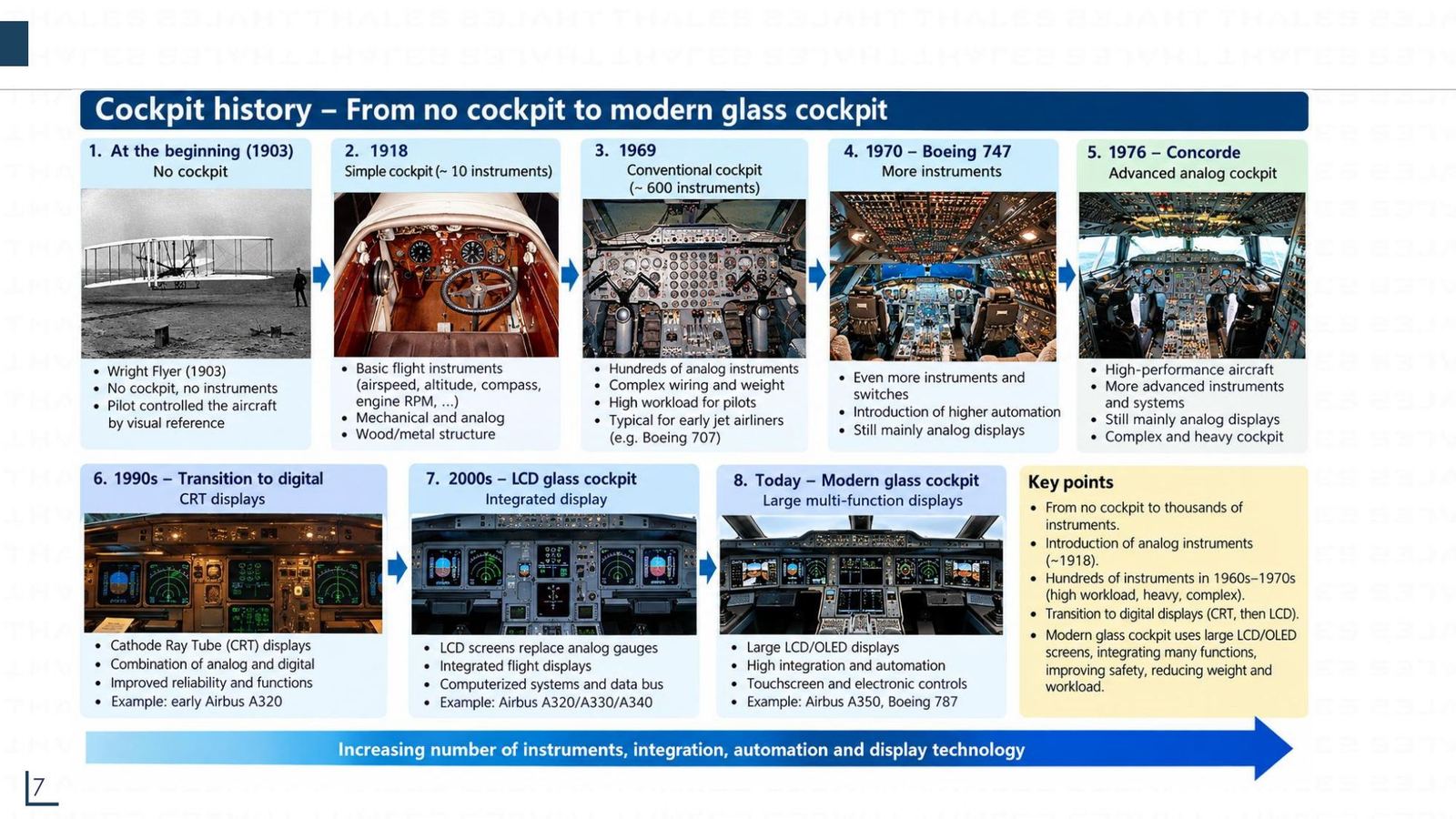
  • Cockpits went from no instruments at all (1903) to hundreds of analogue dials (1960s and 1970s), then to a few large screens
  • Each Airbus generation (A310, A320, A380, A350) replaced more mechanical dials with multifunction displays
  • A display system must satisfy performance, human factors, safety and certification requirements (DO-160, DO-178, DO-254)
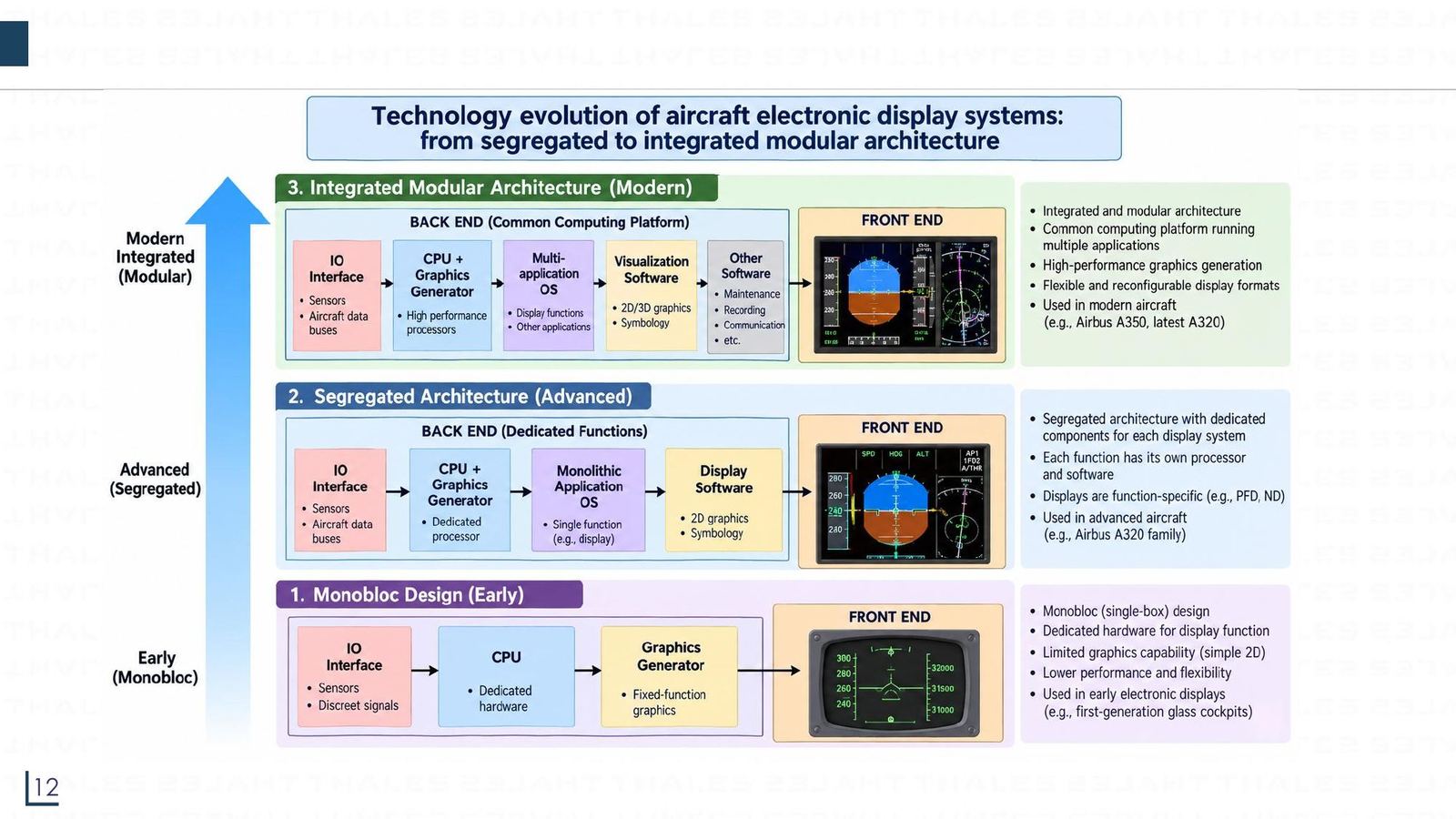
  • Architectures progressed from monobloc, through segregated, to integrated modular
PART 1/5 · 06

A century of cockpits: from no instruments to the glass cockpit

DateCockpit
1903Wright Flyer: no cockpit, no instruments
1918About 10 basic instruments (speed, altitude, compass, engine rpm)
1969, 1970About 600 instruments (Boeing 707, then 747): very high workload
1976Concorde: advanced analogue cockpit, but heavy and complex
1990sMove to digital CRT displays
2000sLCD screens replace analogue gauges (A320, A330, A340)
TodayLarge multifunction LCD/OLED touch screens (A350, Boeing 787)
A century of cockpits: from no instruments to the glass cockpit
Click the image to enlarge
📖 Explained for complete beginners

This history wraps up one trend: later cockpits have fewer separate instruments and more information per screen. Hundreds of dials in the 1960s and 1970s meant hundreds of wires, hundreds of failure points and a lot for the pilot to scan constantly. A digital screen gathers data in one place and can change pages with the phase of flight.

Tooley calls the end result the glass cockpit: CRT and LCD screens show the same kind of information that used to come from electromechanical dials (section 1.1).

PART 1/5 · 06

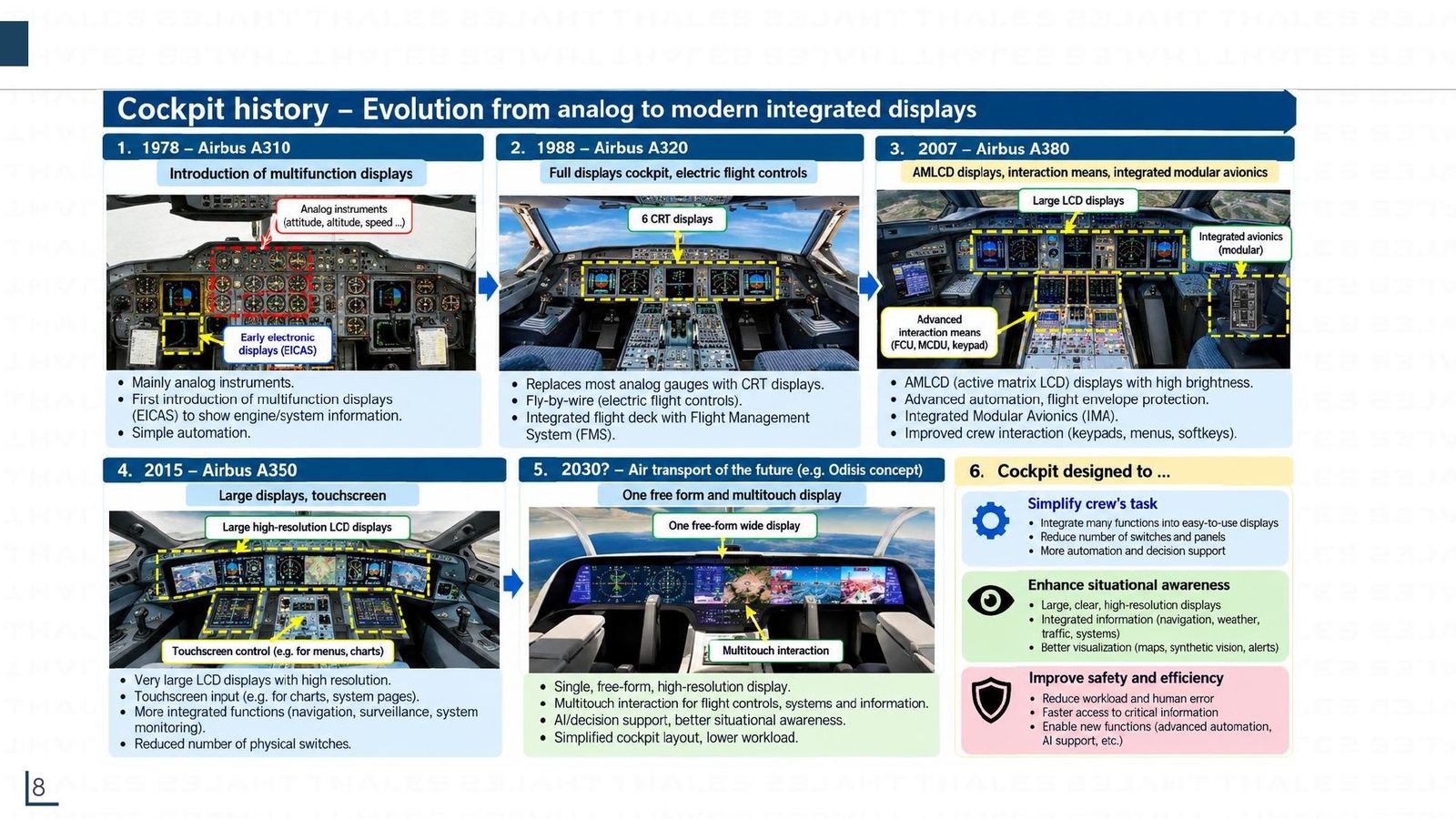
Four Airbus generations: A310, A320, A380, A350

YearAircraftWhat is new in displays
1978A310First multifunction displays (electronic screens for engine and system data)
1988A320"Full display" cockpit: 6 CRT screens, electric flight controls, FMS
2007A380High-brightness AMLCD, IMA (integrated modular avionics), interaction devices (FCU, MCDU, keypad)
2015A350Very large high-resolution LCD, touch input, fewer physical switches

The design goal stays the same throughout: simplify the crew's task, improve situational awareness, improve safety and efficiency.
Four Airbus generations: A310, A320, A380, A350
Click the image to enlarge
📖 Explained for complete beginners

Counting screens helps to remember the A320 milestone: two PFDs, two NDs and two ECAM screens make six, exactly as the slide says "6 CRT displays". On the A350 each pilot has a screen of about 15 inches and there are extra onboard information system (OIS) screens, while the layout stays similar to the A320 so pilots can transition easily (the slide calls it cross crew qualification).

Note: the slide labels the A310's early electronic displays "EICAS", but per Tooley (section 15.3) EICAS is Boeing's name and Airbus calls it ECAM. Use ECAM when talking about Airbus.

PART 1/5 · 06

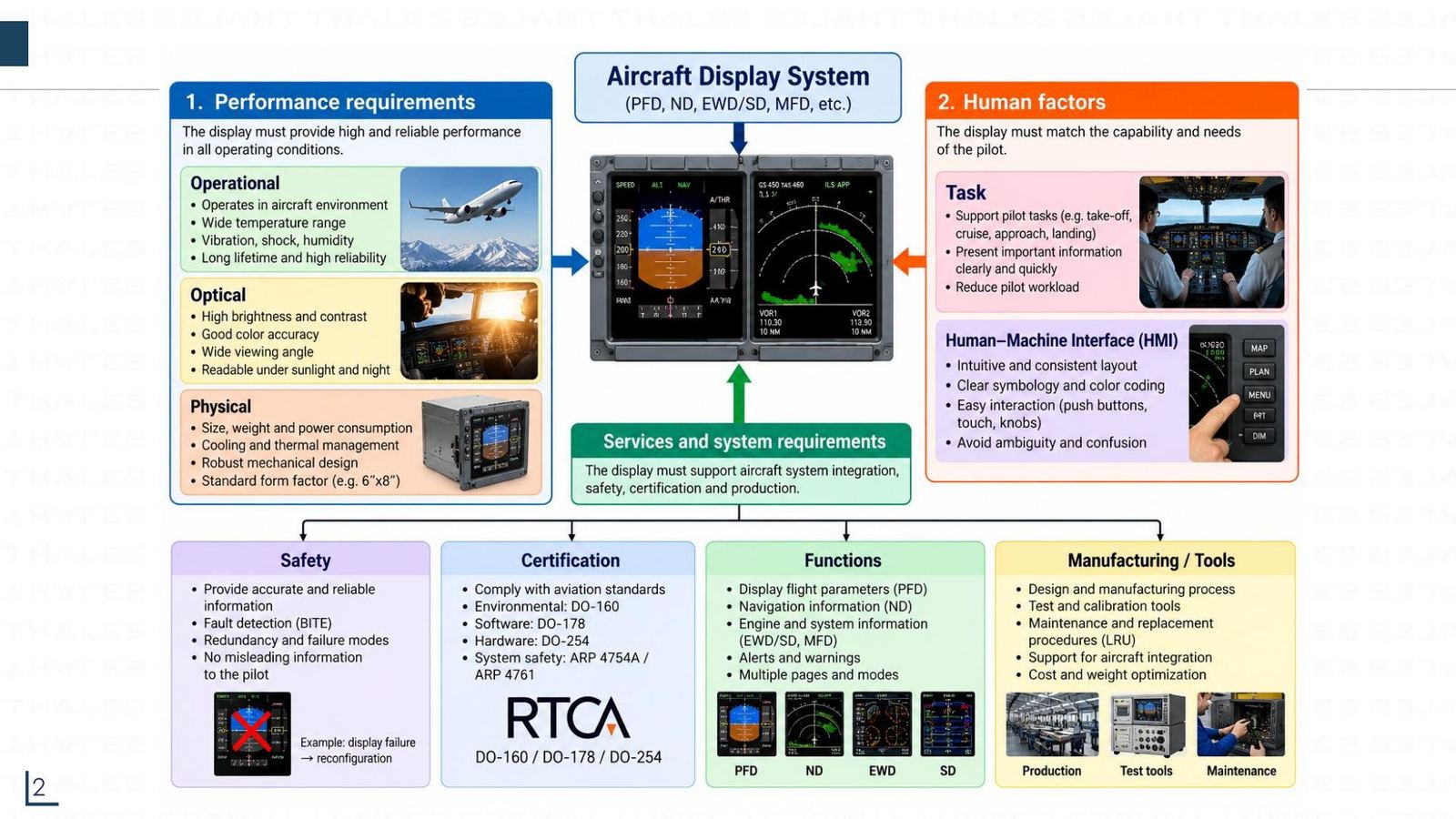
What must a display system satisfy?

The slide splits the requirements into three groups:

  • Performance: survive the aircraft environment (temperature, vibration, shock, humidity), optics (high brightness and contrast, accurate colour, wide viewing angle, readable in sunlight and at night), size, weight, power, cooling.
  • Human factors: support take-off, cruise, approach and landing tasks; an intuitive HMI with consistent symbology and colour.
  • Services and system: safety (BITE, redundancy, no misleading information), certification (DO-160 environment, DO-178 software, DO-254 hardware, ARP 4754A and ARP 4761 system safety), functions (PFD, ND, EWD/SD, MFD), manufacturing and maintenance (LRU).
What must a display system satisfy?
Click the image to enlarge
📖 Explained for complete beginners

An easily missed point: an aircraft display is flight-safety equipment, so its certification has three layers. DO-160 tests environmental tolerance (temperature, vibration, electromagnetic interference); DO-178 governs software quality; DO-254 governs electronic hardware quality. A retail screen might be brighter but would not pass all three.

BITE (built-in test equipment) is self-test capability: the equipment detects its own faults and reports them to the maintenance system (see part 5).

PART 1/5 · 06

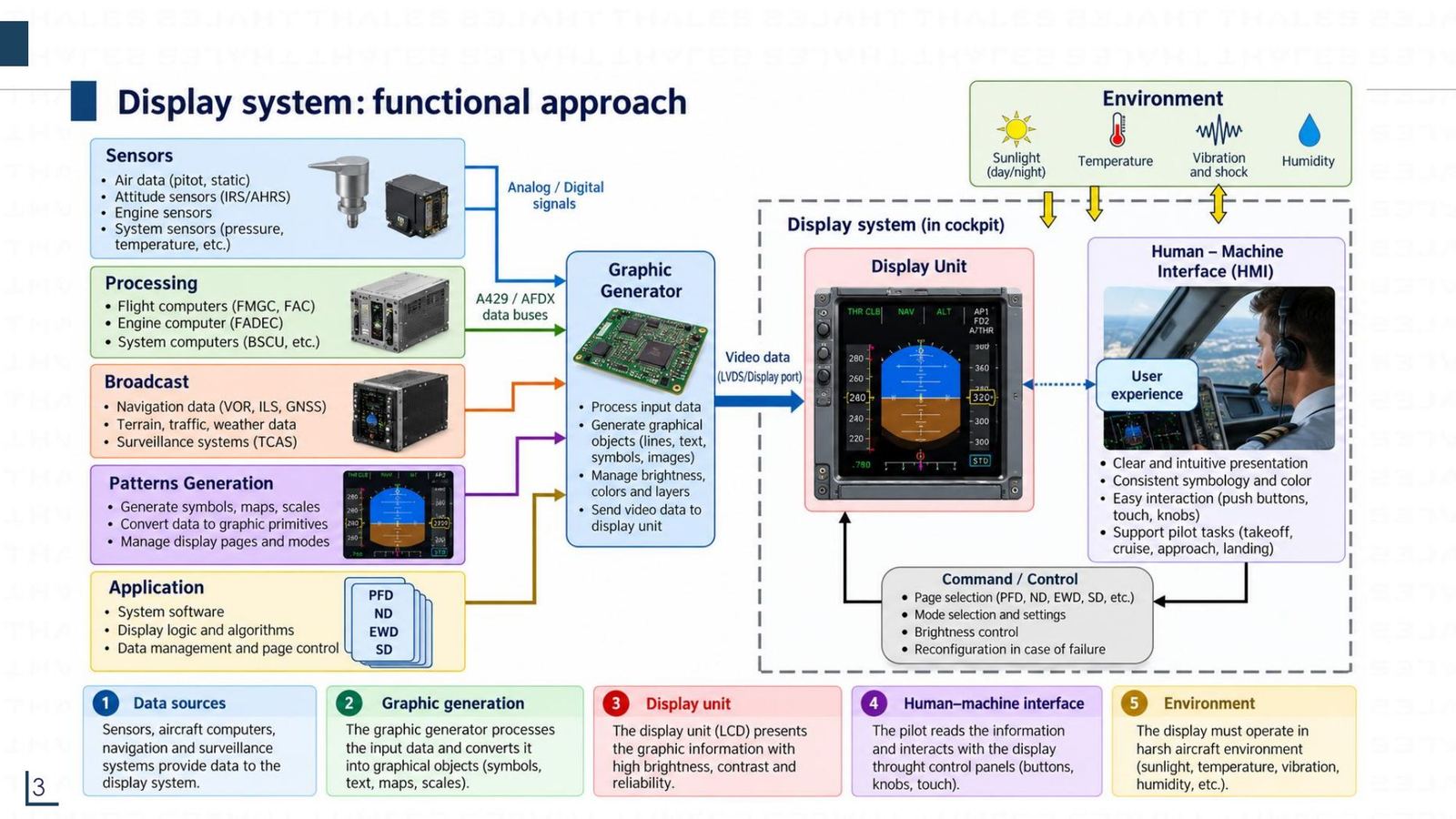
The functional approach: from data to the pilot's eye

The cockpit signal chain has five blocks:

  1. Data sources: sensors (air data, attitude, engine), computers (FMGC, FADEC), navigation data (VOR, ILS, GNSS), surveillance (TCAS).
  2. Graphic generator: receives data over A429 or AFDX buses, builds objects (lines, text, symbols, images), manages brightness and layers.
  3. Display unit: receives the video signal (LVDS/Display port) and shows it.
  4. HMI: the pilot reads and acts with buttons, knobs and touch; commands select pages, modes and brightness.
  5. Environment: sunlight, temperature, vibration and humidity act on the whole system.
The functional approach: from data to the pilot's eye
Click the image to enlarge
📖 Explained for complete beginners

The key point is that a screen does not know by itself what to draw. It only receives video that the graphic generator has already drawn, and the graphic generator receives numbers from the bus. That is why Module 05 (data buses) comes right before this one: a speed value goes from the ADIRU over ARINC 429 to the DMC, the DMC draws it as a speed scale, and only then does it appear on the PFD.

When a screen shows wrong or blank data, the maintenance engineer must know in which of the five blocks the fault sits: data source, bus, graphic generator, or the screen itself.

PART 1/5 · 06

Cognitive load: why more information is not always better

The more complex the system, the more cognitive resources it demands from the pilot. If this exceeds the human maximum, HMI performance drops (the "overload" region). The design aim is to keep the load inside the comfort zone.

The slide lists four cognitive engineering principles: Routinize (standard procedures and automation for routine tasks), Anticipate (predict problems early), Delegate (assign tasks to automation or crew members), Schematize (structure, prioritise and simplify information).
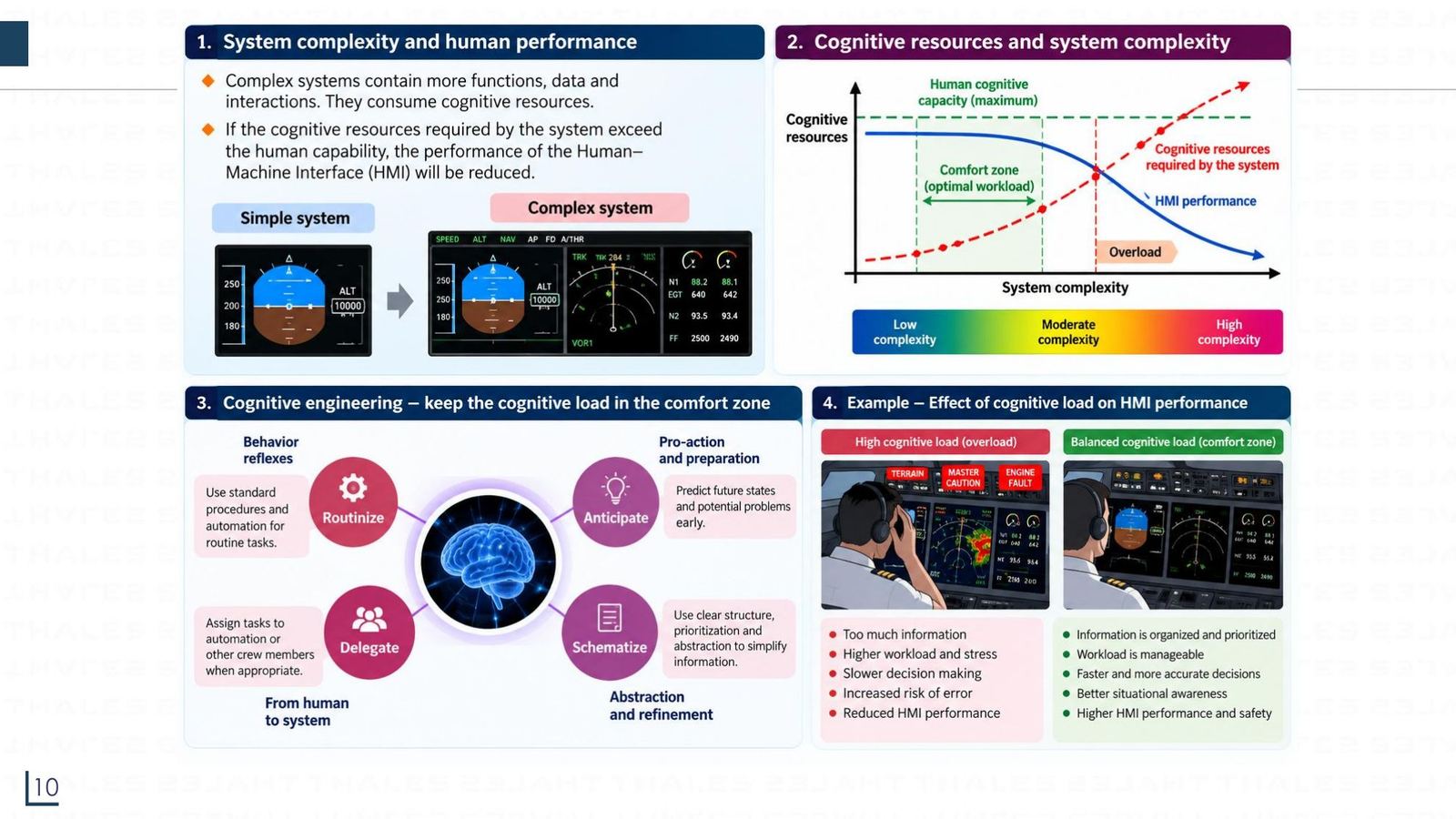
Cognitive load: why more information is not always better
Click the image to enlarge
📖 Explained for complete beginners

The chart in the slide shows two curves: the dashed red line is the cognitive resource the system demands (rising with complexity), the blue line is HMI performance (falling as complexity rises). They cross at the overload threshold. The two example photos below show the same page with too many alerts (stress, slow decisions, error-prone) versus a page that has been organised and prioritised (manageable, fast decisions).

This is why ECAM shows alerts in priority order and has CLR/RCL keys to clear and recall messages (see part 4).

PART 1/5 · 06

Display system architecture: monobloc, segregated, integrated modular

GenerationFeaturesExample
1. Monobloc (early)Single box, dedicated hardware, fixed-function 2D graphics, low flexibilityFirst-generation glass cockpits
2. Segregated (advanced)Each function has its own processor; function-specific displays (PFD, ND)A320 family
3. Integrated modular (modern)Common computing platform running several applications; high-performance 2D/3D graphics; reconfigurable display formatsA350 and latest A320
Display system architecture: monobloc, segregated, integrated modular
Click the image to enlarge
📖 Explained for complete beginners

Think of personal computers. Monobloc is like an old game console that runs exactly one game. Segregated is like several dedicated devices side by side, each doing one job. Integrated modular is like a shared computer running many programs, where you add features by upgrading software instead of replacing hardware.

Benefits of integration: lighter, fewer LRUs, easier maintenance and upgrades. The price: the shared software must be certified very strictly (DO-178), because one defect could affect several functions at once.

PART 2/5
02

Display technology and human vision

  • The smallest invisible pixel size follows from 1 arcminute visual acuity: h ≈ D·θ
  • CRT: electron gun, brightness-controlling grid, anodes, raster scan driven by sawtooth waveforms
  • 7-segment LEDs need a decoder (BCD to 7-segment, for example the 74HC47); an LCD does not emit light
  • AMLCD uses a thin-film transistor (TFT) per pixel and beats CRT on weight, power, volume and reliability
PART 2/5 · 06

Pixels, resolution and image size

A pixel is the smallest picture element carrying colour and brightness information; it usually has three sub-pixels, red (R), green (G) and blue (B). Image size is width times height in pixels.

StandardSizePixel count
HD1280 × 7200.92 MP (slide says about 0.9)
Full HD1920 × 10802.07 MP (about 2.1)
4K UHD3840 × 21608.29 MP (about 8.3)

Resolution is pixels per inch (PPI), or equivalently pixel size in mm.
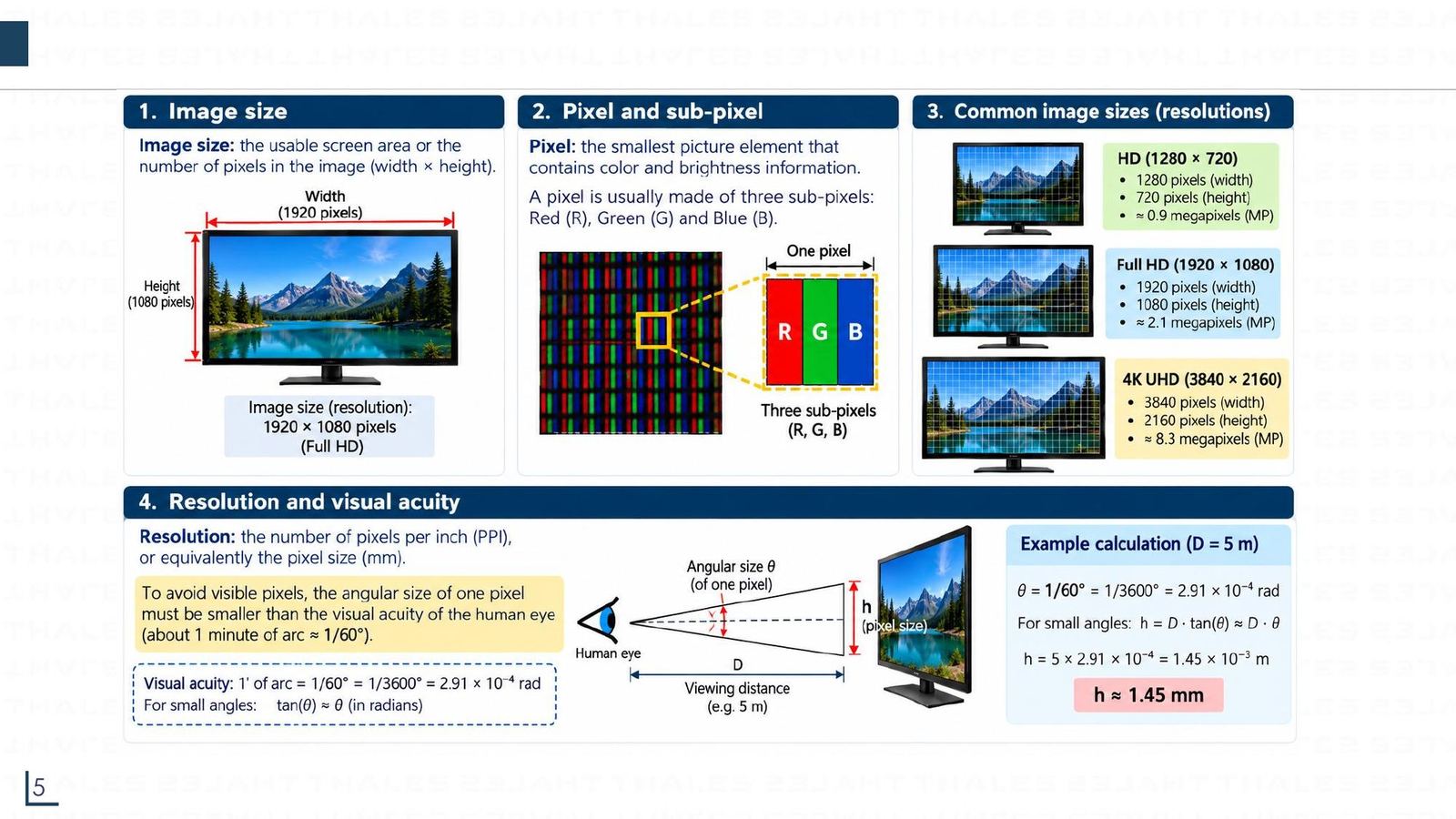
Pixels, resolution and image size
Click the image to enlarge
📖 Explained for complete beginners

The three megapixel figures were re-checked by multiplication: 1280×720 = 921,600; 1920×1080 = 2,073,600; 3840×2160 = 8,294,400 (they match the slide after rounding).

A point to remember when comparing: 4K UHD has twice the width and twice the height of Full HD, so it has four times as many pixels (8.29 versus 2.07 MP), not twice.

PART 2/5 · 06

Visual acuity of 1 arcminute: when the eye can no longer see pixels

A normal human eye can separate two points at least 1 arcminute apart (1' = 1/60 degree = 2.91×10⁻⁴ rad). For small angles tan θ ≈ θ, so the smallest visible size at distance D is h ≈ D·θ.

D1 m3 m5 m10 m20 m
h0.29 mm0.87 mm1.45 mm2.91 mm5.82 mm

The eye's spectral sensitivity peaks at 555 nm (green light); reference marks are blue 470 nm, green 532 nm, red 615 nm.
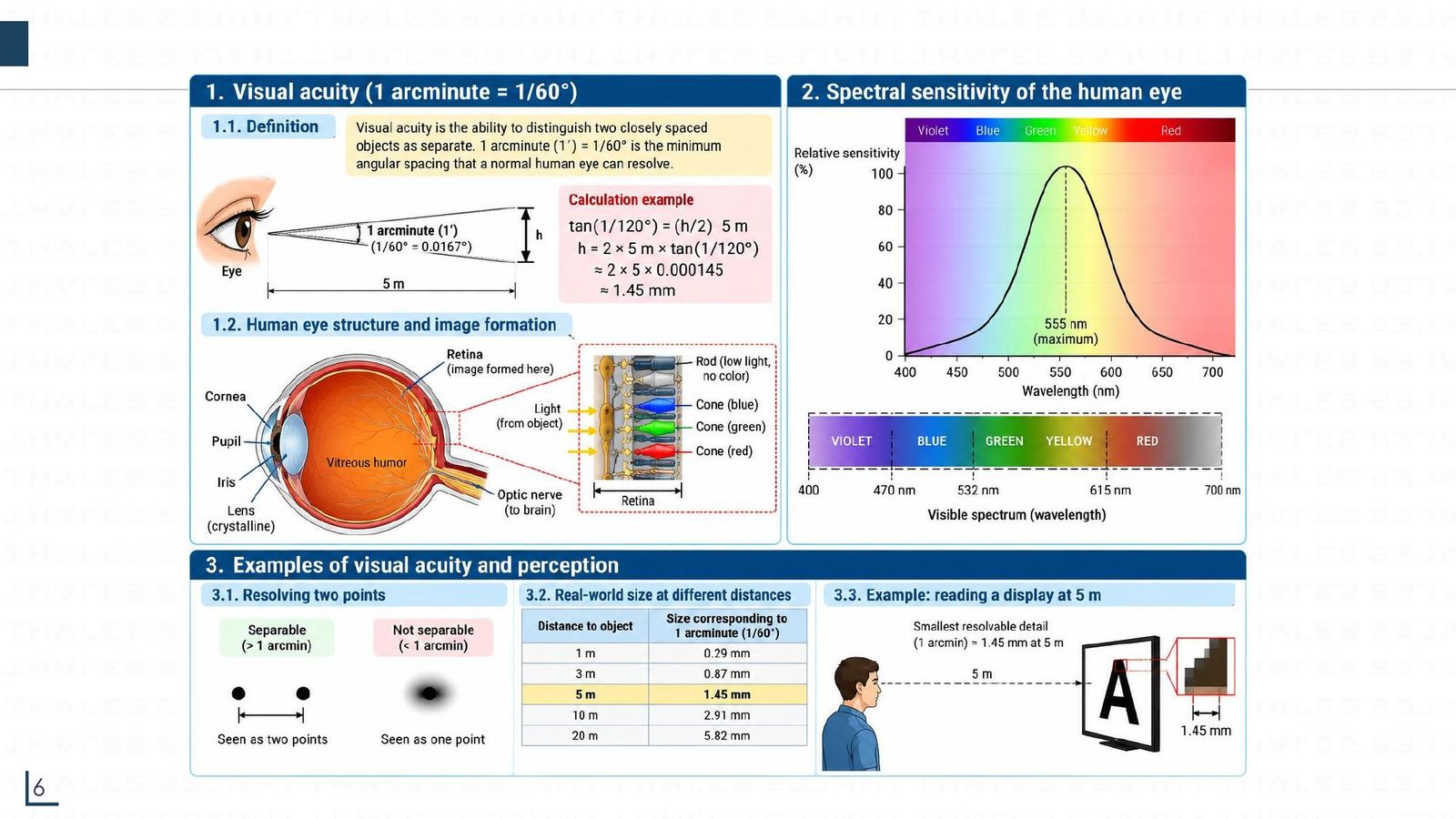
Visual acuity of 1 arcminute: when the eye can no longer see pixels
Click the image to enlarge
📖 Explained for complete beginners

Self-check: convert 1/60 degree to radians: (π/180)/60 = 2.909×10⁻⁴. At D = 5 m, h = 5 × 2.909×10⁻⁴ = 1.45×10⁻³ m = 1.45 mm. The more exact 2·D·tan(θ/2) gives the same result to four digits. All five table values were recomputed in the notebook.

Design meaning: if a cockpit screen's pixels are smaller than h at the distance the pilot sits (about 0.6 to 0.8 m), the eye cannot see individual pixels, which is why high resolution matters for screens close to the eye. The 555 nm peak also explains why green is used for normal values: it is the colour the eye is most sensitive to.

PART 2/5 · 06

CRT: electron gun, control grid and anodes

The cathode ray tube (CRT) has an electron gun (cathode with heater, grid, focus anodes) firing a beam of electrons at the phosphor coating on the back of the screen.

  • The cathode is coated with thoriated tungsten; the heater makes electrons "boil off".
  • The grid is negative with respect to the cathode; the grid voltage controls how many electrons pass, i.e. brightness.
  • The focus anodes bend and focus the beam like a biconvex lens.
  • The final anode (graphite coating inside the tube) is held at a very high positive potential (several kilovolts, DC) to accelerate the beam.
  • Impact on the phosphor converts electron energy into light.
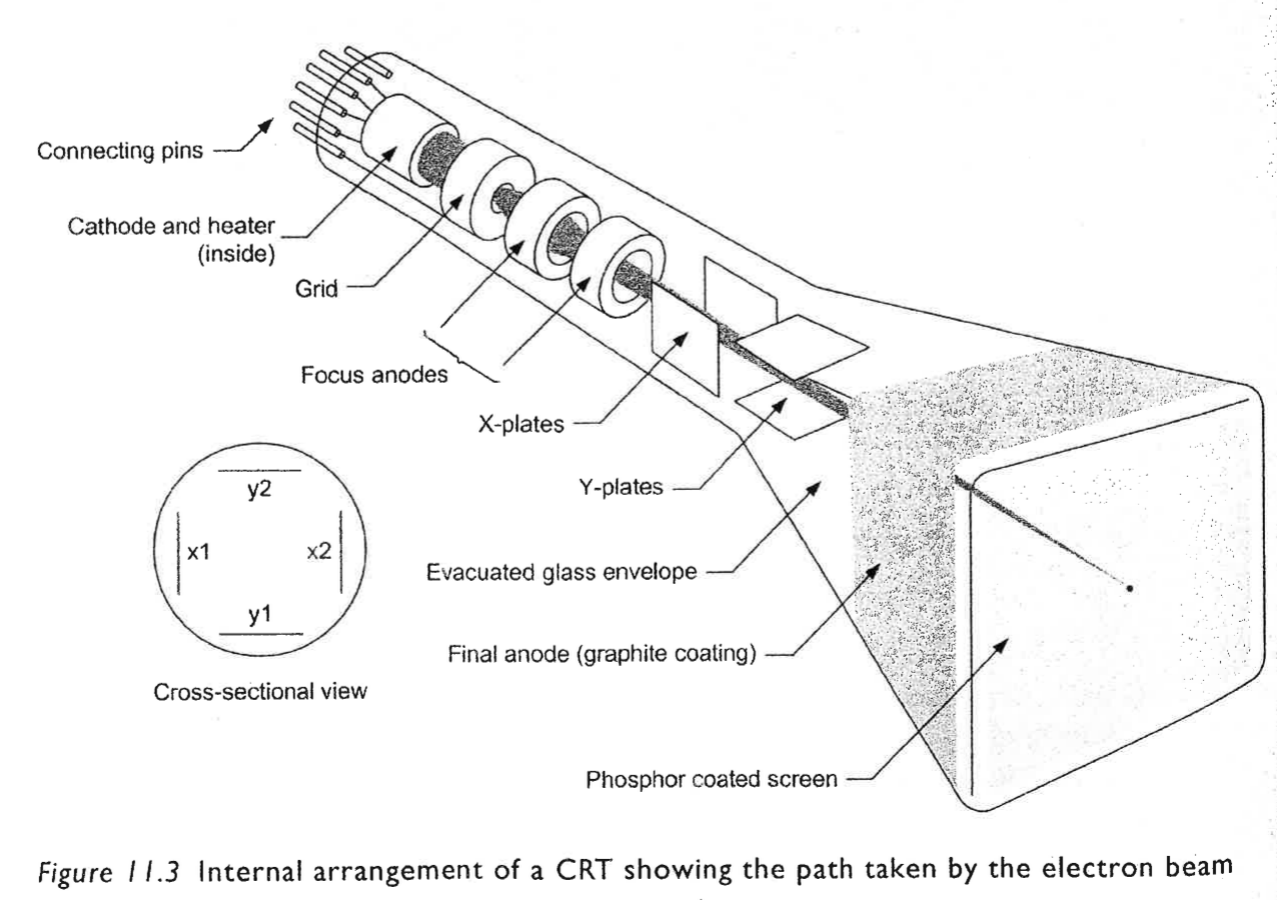
Tooley Fig 11.3 CRT
📖 Explained for complete beginners

Three of the book's multiple-choice questions revolve around exactly this: the grid is negative with respect to the cathode (Q7), the final anode accelerates the beam (Q8) and needs a high-voltage DC supply (Q12). To remember: picture the grid as a water valve; the more negative it is, the more it pushes electrons back, so fewer reach the screen and it is darker.

Source: Tooley section 11.1.1, page 180, Figure 11.3 (the image below is cropped from that page).

PART 2/5 · 06

Raster scan: sawtooth waveforms, line count and frequency

To cover the whole screen the electron beam scans top to bottom and left to right, producing a raster. The voltages on the X and Y plates are sawtooth (ramp) waveforms at two different frequencies.

Book exampleY (vertical)X (horizontal)One frame
4-line raster50 Hz200 Hz20 ms
400 lines100 Hz40 kHz10 ms

Rule: f_X = N_lines × f_Y, frame time T = 1/f_Y.

📖 Explained for complete beginners

Why multiply? Within one period of the vertical scan the beam must draw N horizontal lines, so the horizontal scan runs N periods in the same time: 4 lines × 50 Hz = 200 Hz; 400 lines × 100 Hz = 40,000 Hz. Both Tooley examples in section 11.1.3 (page 182) fit this rule and were verified in the notebook.

Also from Tooley section 15.2.2: CRTs in the EFIS scan the raster at 50 or 60 Hz, while symbols and characters are drawn by stroke scanning superimposed on the raster; colour CRTs use magnetic deflection, so the coil waveform must be trapezoidal rather than a straight sawtooth, because the coil has resistance.

PART 2/5 · 06

Colour CRT and the CRT controller

A colour CRT has three cathodes (red, green, blue) and interleaved phosphors of three colours. Each beam hits only phosphors of its own colour. Mixing: red + green = yellow, green + blue = cyan, red + blue = magenta, all three = white.

On the control side, a CRT controller works with a video/sync interface under a dedicated CPU. DMA feeds data in so the CPU does not process each byte; the character shapes live in a character generator ROM, each character being a cell matrix (8×8 or 9×14).

📖 Explained for complete beginners

This is where digital electronics meets the display. The character generator ROM is exactly the read-only memory of Module 04: the address is the character code plus the row number within the character cell, the data is the bit pattern of that row, serialised into the video channel. Each bit that is on lights its pixel.

The book's multiple-choice question 15 (where are the character patterns stored) has the character generator ROM as the answer; question 10 asks which colours the three beams of a colour CRT correspond to: red, green, blue.

PART 2/5 · 06

LEDs and the 7-segment display

An LED works at a forward current of about 5 to 20 mA and about 2 V forward drop, and is far more reliable than a filament lamp. Red LEDs are the most common (peak about 635 to 650 nm); a round LED's viewing angle is about 20 to 40 degrees.

A 7-segment display uses seven LEDs a to g. Digit "1" lights segments b and c; digit "2" lights a, b, g, e, d. Since each segment is its own LED, a decoder is needed to turn BCD into seven drive lines.
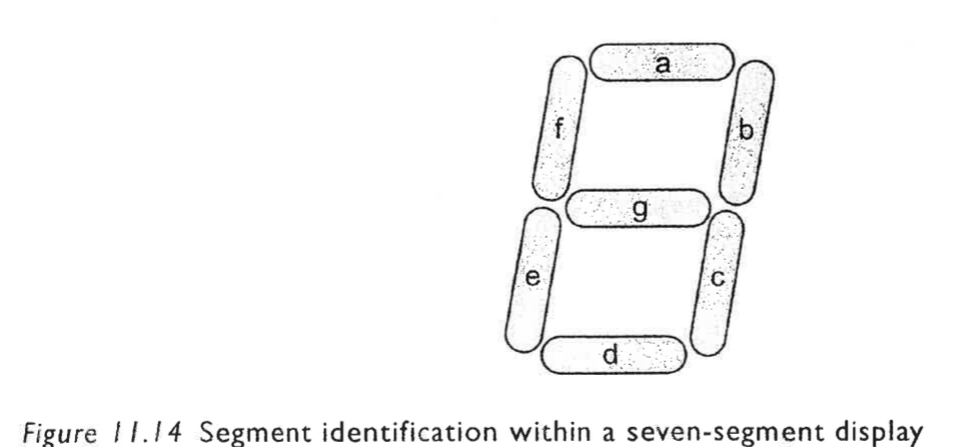
Tooley Fig 11.14 seven-segment
📖 Explained for complete beginners

Three of the book's multiple-choice questions sit here. Q1: a red LED peaks near 635 nm (Table 11.1). Q5: segments a, b, c, d, g displays the digit 3 (a 2 needs e instead of c, a 5 needs f instead of b). Q6: BCD 1001 displays the digit 9. The module notebook checks all three.

A self-computed current-limiting resistor example: 5 V supply, standard 5 mm LED at 10 mA with 2.0 V forward drop (Tooley Table 11.1): R = (5 − 2.0)/0.010 = 300 Ω. This is the module's own worked example, not a book exercise.

PART 2/5 · 06

BCD to 7-segment decoding and letter display (Floyd)

In chapter 4, the Applied Logic section (pages 244 to 249), Floyd designs a hexadecimal to 7-segment decoder for the letters A, b, C, d, E (F is all off). The display is common-anode, so a segment lights when its output is LOW; codes 0 to 9 are "don't care" (X) cells on the Karnaugh map.

LetterCode H3H2H1H0Segments on (Table 4-14)
A1010a, b, c, e, f, g
b1011c, d, e, f, g
C1100a, d, e, f
d1101b, c, d, e, g
E1110a, d, e, f, g
📖 Explained for complete beginners

Simplified results (verified with sympy in the notebook): a = H0; e = H2H1H0 (one 3-input AND gate); f = H2H0 (one 2-input AND). The simplification is so strong that segment a just wires through the H0 input, with no gate at all.

Lowercase b and d are used because a capital B looks like an 8 and a capital D looks like a 0. An "invalid code detector" H3(H1 + H2) enables the display only for codes 1010 to 1111 (see Problems 63 and 69 below). An LED can be seen in the dark but an LCD cannot, since an LCD does not emit light.

PART 2/5 · 06

74HC47, zero suppression and digit multiplexing (Floyd ch.6)

The 74HC47 (Floyd section 6-5, pages 338 to 340) decodes BCD and can drive a common-anode 7-segment display directly. All outputs a to g and the LT, RBI, BI/RBO pins are active LOW.

  • LT = 0 (with BI/RBO = 1): turns on all seven segments, a lamp test.
  • RBI = 0 with code 0000: turns every segment off and drives RBO = 0, to blank unnecessary zeros (leading zero suppression: 030.080 shows as 30.08).
  • Multiplexing (Figure 6-49, page 353): the 74HC157 selects between two BCD codes, the 74HC47 decodes, the 74HC139 enables each digit in turn; if the rate is high enough the eye sees no flicker.
📖 Explained for complete beginners

Three Floyd Section Checkup questions (printed answers on page 384): a decoder used with a common-cathode display must have active-HIGH outputs (so the 74HC47 suits common-anode, not common-cathode); the 74HC157 multiplexes two BCD codes; the 74HC139 enables the two displays alternately.

Floyd Problem 38 (troubleshooting the 7-segment multiplexing system) and Problem 44 (adding two digits) are even-numbered, so the book prints no answers; this module therefore gives no solution for them. What the book does confirm: the select frequency must be high enough that the eye sees no flicker.

PART 2/5 · 06

LCD: an electronic light switch

Liquid crystals sit between solid and liquid; their molecular orientation (and thus the path of light) is controlled by an electric field. An LCD emits no light itself, so it needs a backlight or reflected light.

  • Structure: backlight, rear polariser, TFT glass with electrodes, liquid crystal, RGB colour-filter glass, front polariser.
  • Pixel OFF: molecules rotate so light is blocked (dark). Pixel ON: light passes (bright).
  • Brightness follows the voltage (slide: 0 V black to 5 V white); colour comes from three sub-pixels R, G, B.
  • A TFT acts as a switch: the gate line selects the row, the data line carries the voltage, a capacitor holds the charge until the next refresh.
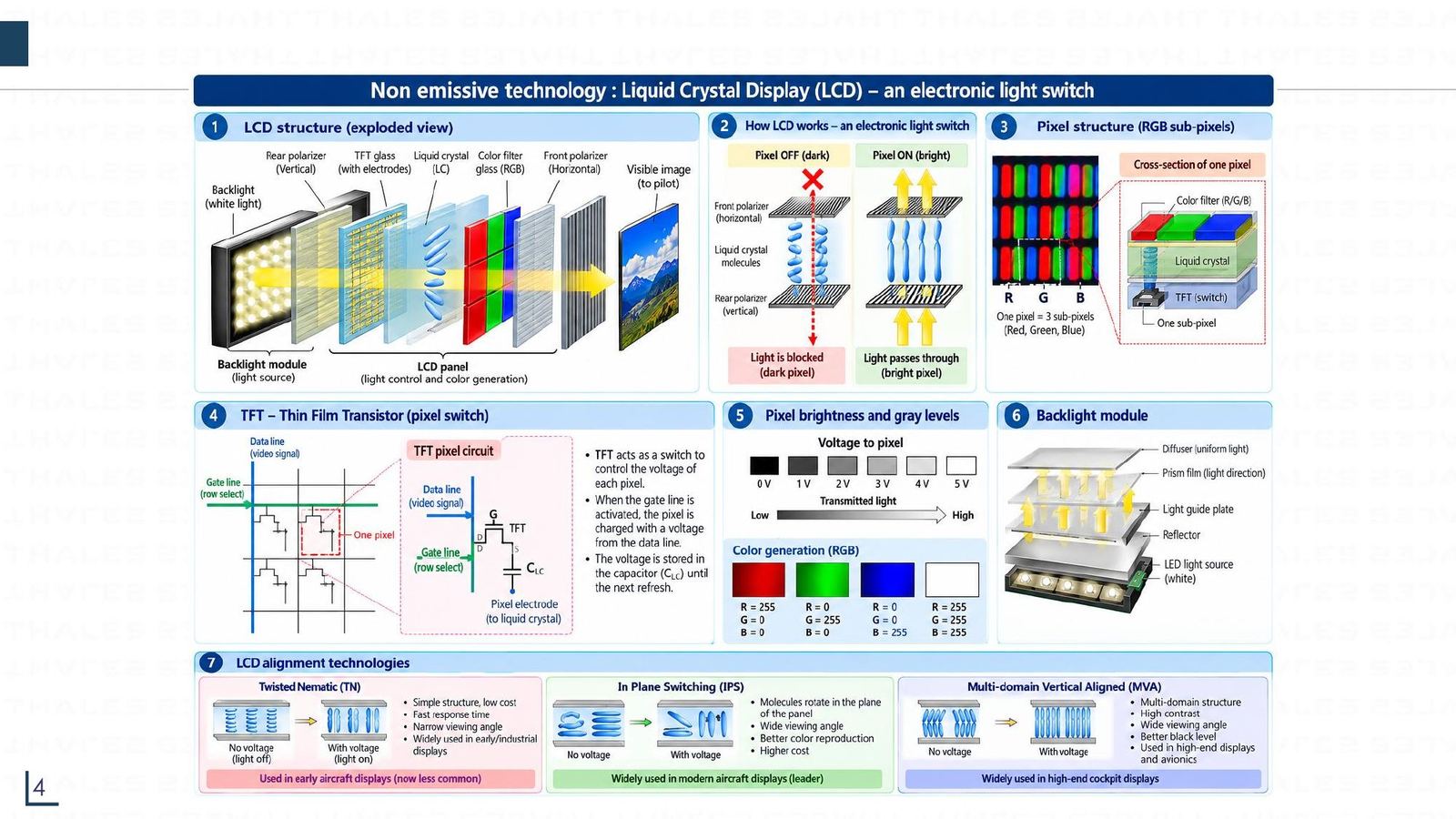
LCD: an electronic light switch
Click the image to enlarge
📖 Explained for complete beginners

The slide also lists three crystal alignment technologies: TN (simple, cheap, fast response but a narrow viewing angle; used in early aircraft displays), IPS (molecules rotate in the plane, wide viewing angle, good colour; the leader in modern aircraft displays), MVA (multi-domain vertical, high contrast, deep blacks; used in high-end cockpits).

The figure is a dense infographic slide; click it to enlarge.

PART 2/5 · 06

Reflective and backlit LCDs, passive and active matrix, versus CRT

Per Tooley (section 11.3): a reflective LCD uses incident light and a mirror; a backlit LCD uses its own light source. A passive matrix addresses rows and columns like a memory matrix, with a slow response and lower sharpness. An active matrix (AMLCD) adds a thin-film transistor (TFT) per cell; each R, G, B channel has 256 levels, giving 256³ = more than 16 million colours.

Versus CRT: the AMLCD wins on weight, power, volume and reliability; has uniform brightness, resolution and focus across the screen; does not wash out in strong light; tolerates vibration and shock. The CRT still has a wider viewing angle and a wider temperature range.
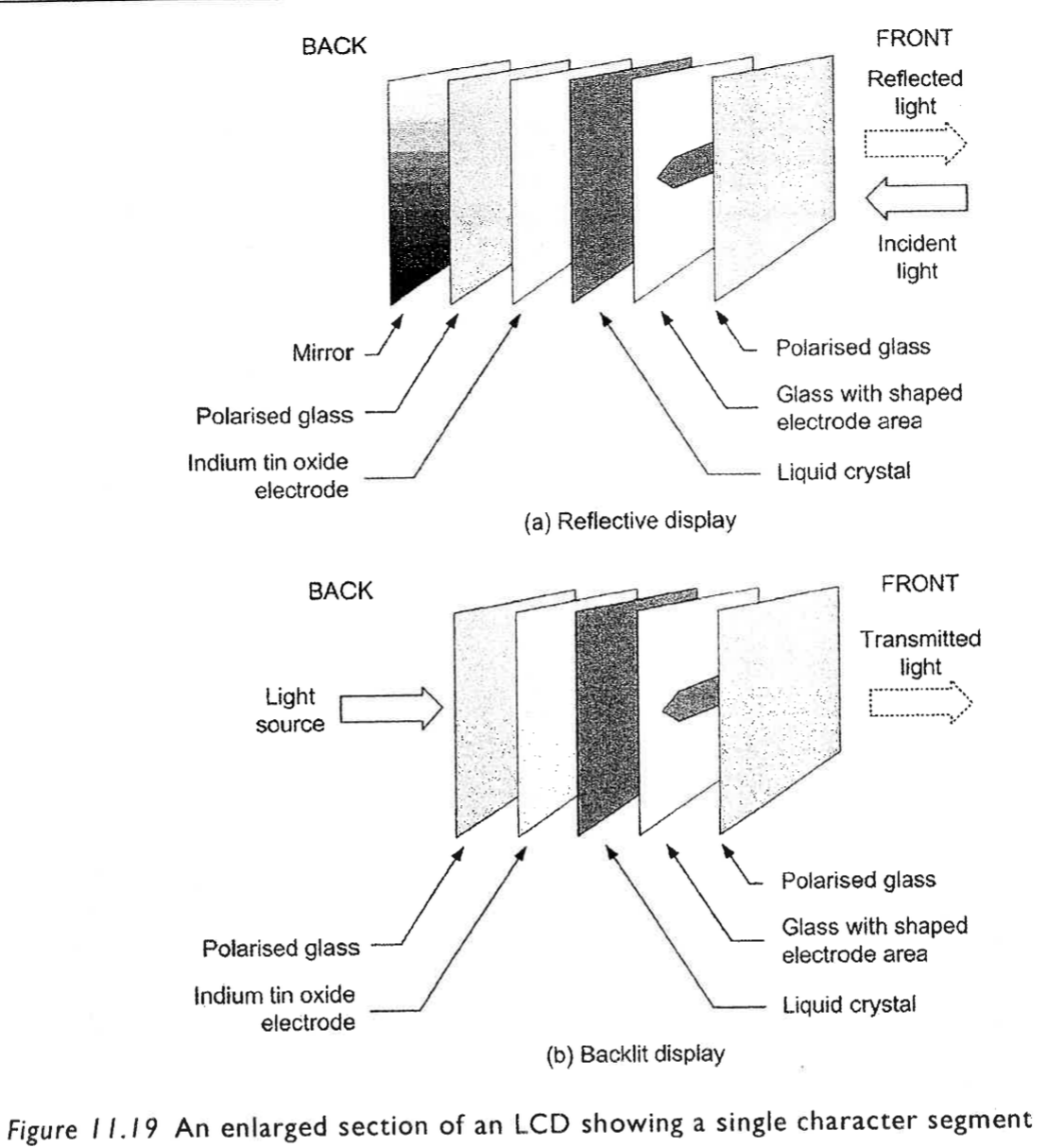
Tooley Fig 11.19 LCD
📖 Explained for complete beginners

Two answers to remember for the quiz: Q11, the AMLCD has smaller volume and greater reliability than a CRT; Q16, compared with a passive matrix the AMLCD is faster and sharper. The book's key point: the CRT has a wider viewing angle and temperature range, but the AMLCD is superior in showing complex, highly configurable displays.

PART 3/5
03

EFIS and EIS: PFD, ND

  • EFIS comprises the PFD (attitude, airspeed, altitude) and the ND (horizontal situation, navigation, weather radar)
  • Airbus went from 5x5 inch CRT (A310) and 6x6 inch CRT (A320) to the LCDU 725 and EDU 725
  • On the A320 the DMC generates the PFD, ND and ECAM images; the FWC generates warnings; the SDAC collects system data
  • Three symbol generators: left, right and a centre one as backup
PART 3/5 · 06

Basic flight instruments, the T layout and EADI/EHSI (Tooley ch.1)

Six basic quantities: heading, altitude, airspeed, rate of turn, rate of climb, attitude. The air data instruments run from the pitot-static system: airspeed (ASI), altimeter and vertical speed (VSI). Static pressure goes to all three; ram pressure only to the ASI.

The T layout: ASI on the left, ADI (artificial horizon) top centre, altimeter on the right, HSI below the ADI. EFIS gathers them into the EADI (attitude, command bars, glide slope pointer, localiser indicator, slip indicator) and the EHSI (heading, VOR, DME, ILS, wind).

📖 Explained for complete beginners

This is the groundwork for the 27 chapter 1 quiz questions. For example: the glide slope pointer and the "rising runway" are on the EADI; the slip indicator is also on the EADI; heading, VOR and track appear on the EHSI; engine parameters such as turbine speed appear on the ECAM. The flight director system takes data from both the attitude gyro and the VOR/localiser.

Source: Tooley sections 1.1 and 1.2 (pages 1 to 19); the T layout is in Figure 1.23.

PART 3/5 · 06

EFI and EFIS: screens replacing mechanical dials

An EFI (Electronic Flight Indicator) is a flight instrument that shows flight parameters on an LCD screen, replacing electromechanical attitude, speed and altitude indicators. Standard sizes are 3 ATI or 4 ATI (the same case size as mechanical dials); it is widely used on training and military aircraft.

Structure: sensor data (ADIRU, air data, FMS/GPS) over ARINC 429 → electronic processing unit (receives data, computes flight parameters, generates graphics, drives the LCD) → LCD screen (LED backlight, panel, polariser, glass bezel) → flight information.
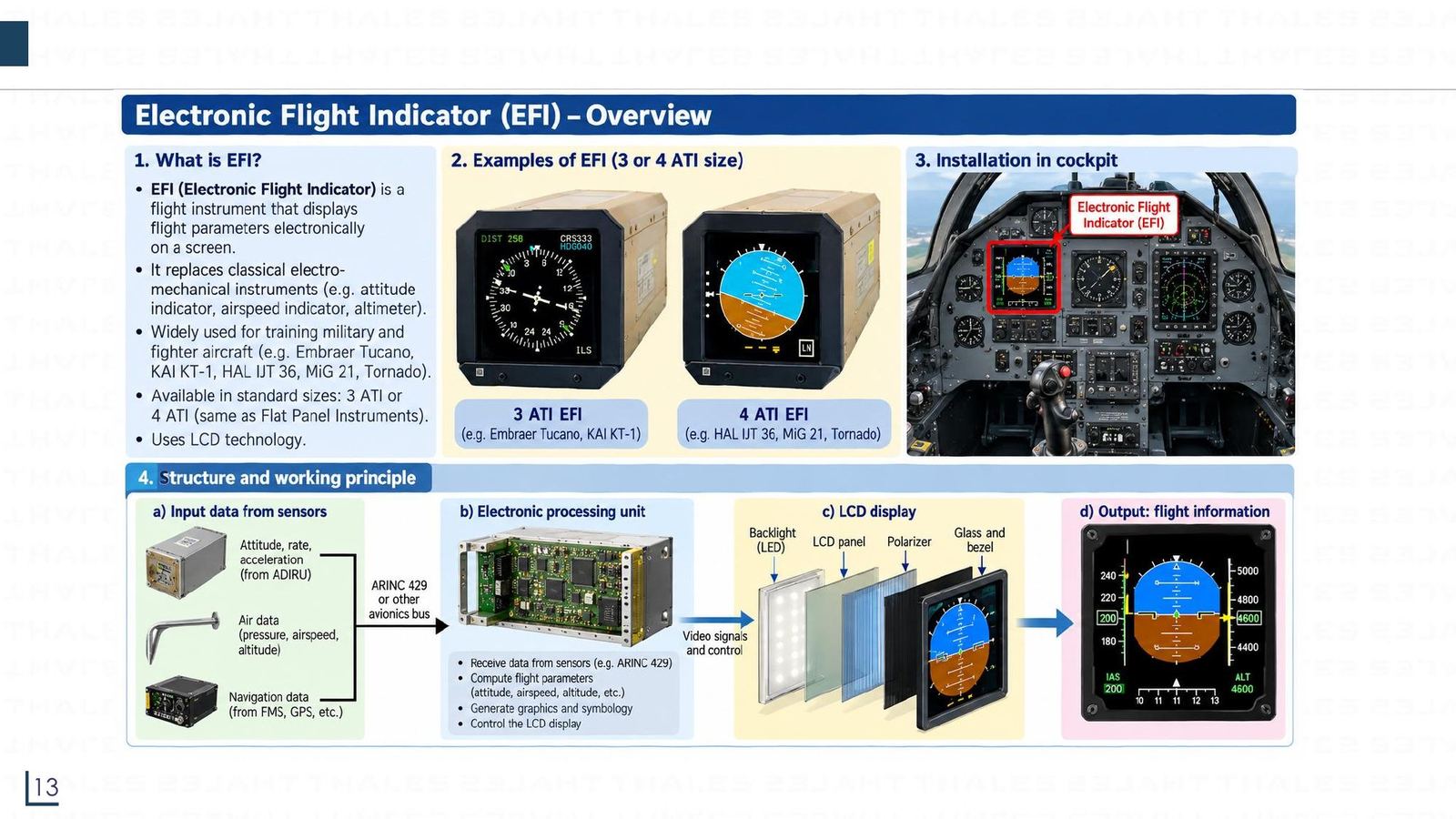
EFI and EFIS: screens replacing mechanical dials
Click the image to enlarge
📖 Explained for complete beginners

The EFI is the small version of the EFIS idea: the same chain of sensor, processor, bus and display, just packed into one box instead of several LRUs as on an airliner. It is an example of the "single-box concept" Tooley mentions at the start of chapter 11: the display and its electronics in one enclosure cut cabling and simplify maintenance.

PART 3/5 · 06

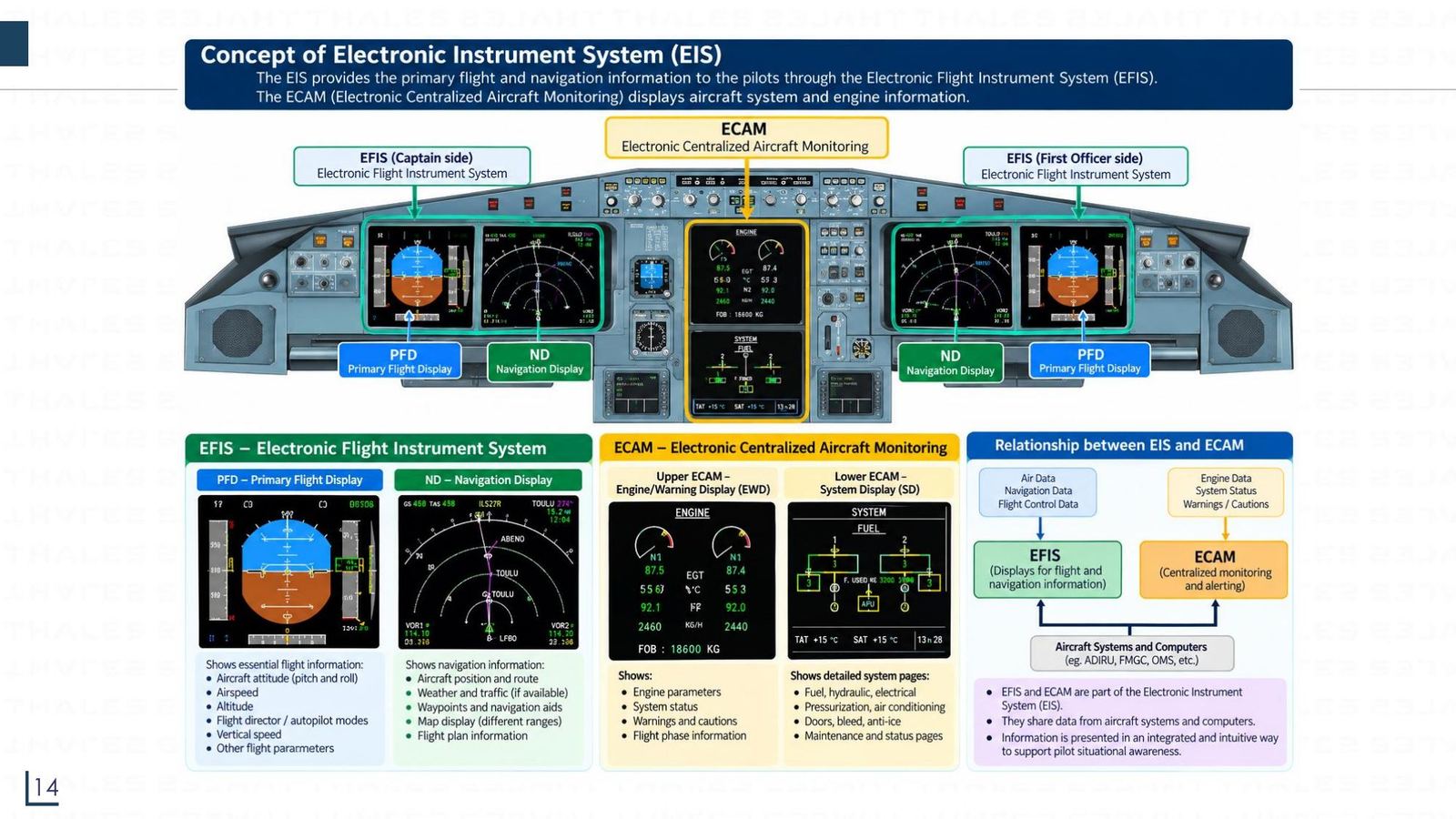
EIS = EFIS + ECAM in the A320 cockpit

The EIS (Electronic Instrument System) has two parts: the EFIS (Electronic Flight Instrument System), a PFD and an ND on each side (captain and first officer), and the ECAM (Electronic Centralised Aircraft Monitoring), two screens in the middle (E/WD upper, SD lower).

EFISECAM
ScreensPFD, NDE/WD (engines, warnings), SD (system pages)
DataAir data, navigation, flight controlEngines, system status, warnings
EIS = EFIS + ECAM in the A320 cockpit
Click the image to enlarge
📖 Explained for complete beginners

A short way to remember: EFIS handles "how is the aircraft flying and where is it going", ECAM handles "how healthy is the aircraft". Both share data from the system computers (ADIRU, FMGC, OMS) and present it in an integrated way so pilots grasp the situation quickly. Quiz question 9 (chapter 1) and 2 (chapter 15): engine parameters appear on the ECAM, not on the EHSI or EADI.

PART 3/5 · 06

Airbus EIS generations: CRT, then LCD

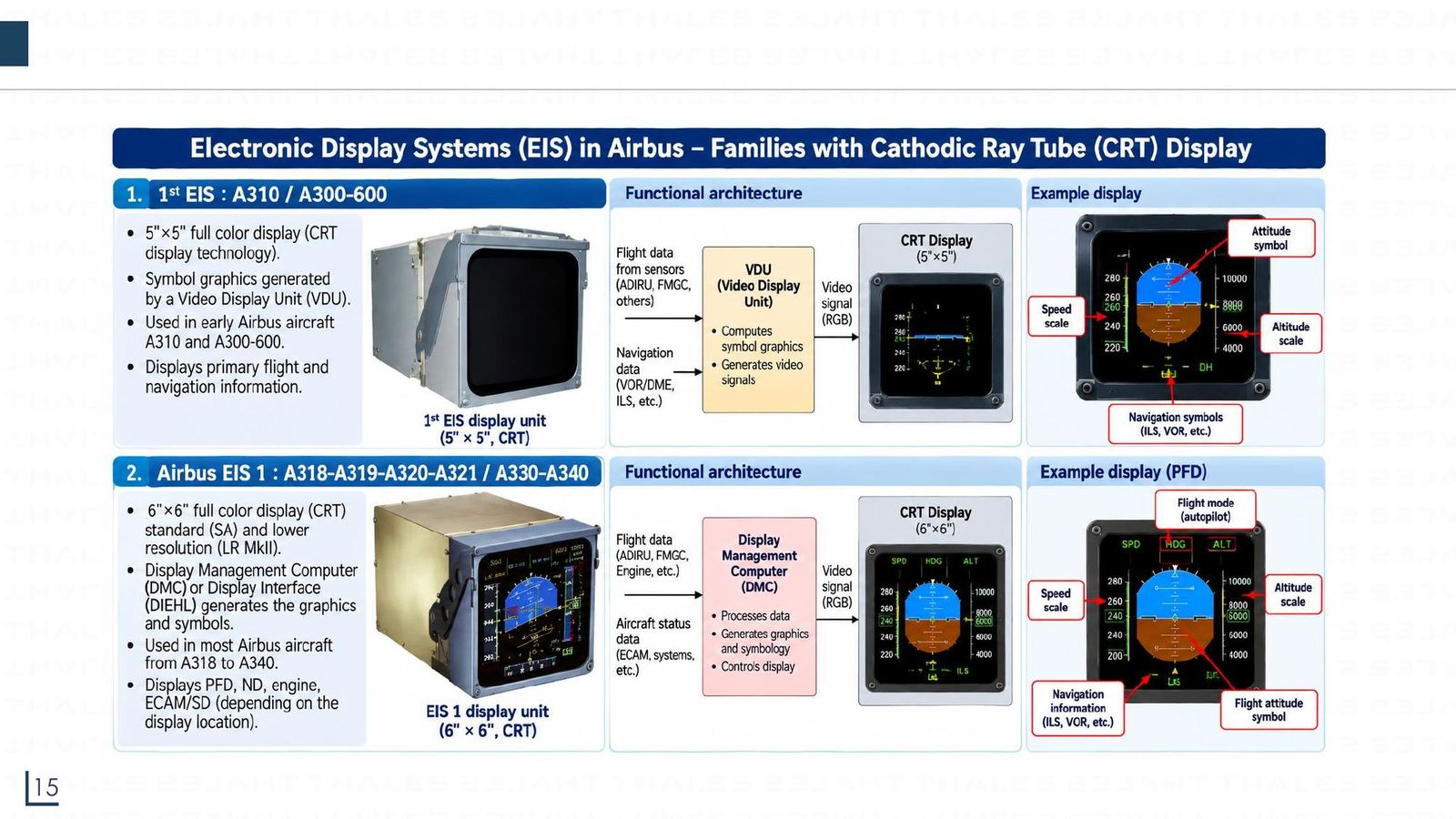
GenerationAircraftScreenImage generator
First EISA310, A300-6005"×5" colour CRTVDU
EIS 1A318 to A321, A330, A3406"×6" colour CRTDMC or DIEHL
EIS 2AirbusLCDU 725 (LCD)DMC (Diehl)
Evolution F3AirbusEDU 725 (6"×6" CRT)VCGP inside the EDU

The LCDU 725 has eight modules: housing, interconnection, power supply (115 V AC to DC), pre-processing, graphic processor, video processor (optional), LCD assembly, backlight.
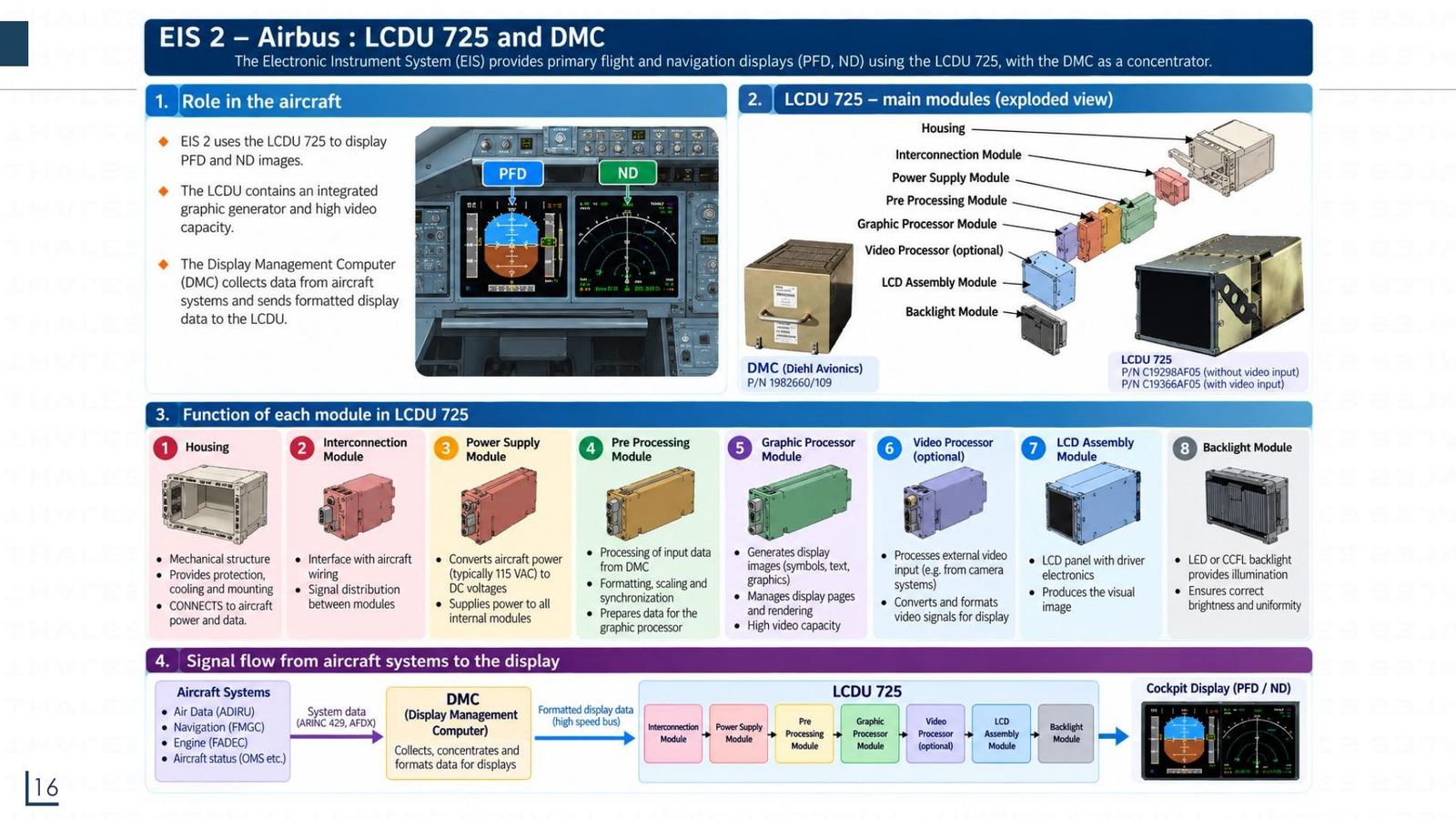
LCDU 725 modules
Airbus EIS generations: CRT, then LCD
Click the image to enlarge
📖 Explained for complete beginners

Evolution F3 is not a new screen type: its aim is lower cost and weight, fewer LRUs, reuse of existing blocks and compatibility with EIS 2. The new names are EDU (Enhanced Display Unit) and EEIS (Enhanced Electronic Instrument System). Inside the EDU 725: ICB (interface control board), VCGP (video graphic processor), DMB (display module board), BLU (backlight unit), PSB (power supply board).

The overall signal chain stays the same: aircraft systems → ARINC 429/AFDX bus → DMC → display.

PART 3/5 · 06

The A320 EIS: DMC, FWC and SDAC

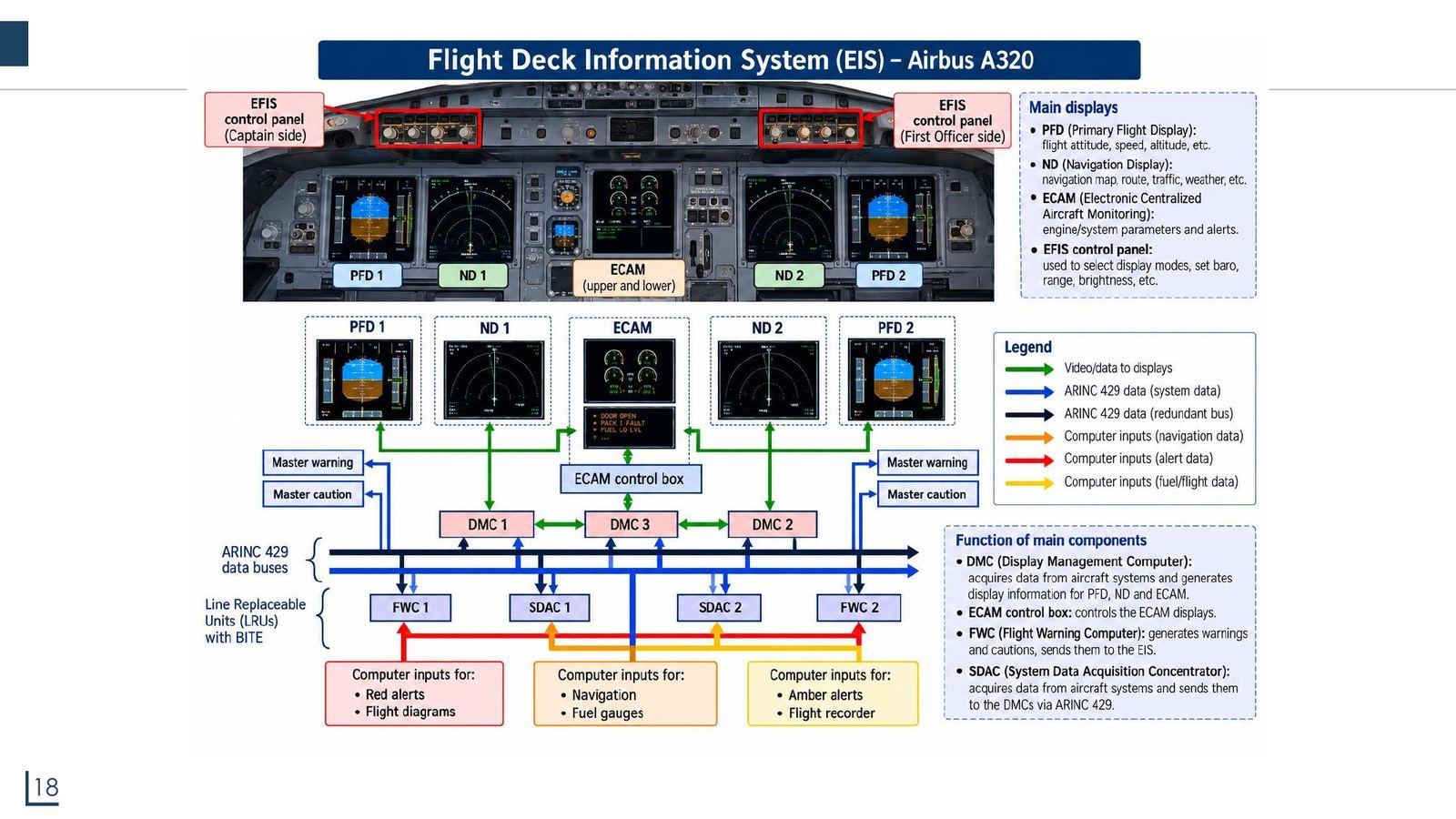
  • DMC 1, 2, 3 (Display Management Computer): collect data from aircraft systems and generate the information for the PFD, ND and ECAM. DMC 3 backs up DMC 1 or 2.
  • FWC 1, 2 (Flight Warning Computer): generate warnings and cautions, sending them to the EIS and the Master Warning/Caution lights.
  • SDAC 1, 2 (System Data Acquisition Concentrator): gather system data and pass it to the DMCs over ARINC 429.
  • ECAM control box: page selection; the EFIS control panels on each side: mode, range, brightness.

All these LRUs have BITE (self-test) and exchange data over two redundant ARINC 429 buses.
The A320 EIS: DMC, FWC and SDAC
Click the image to enlarge
📖 Explained for complete beginners

This diagram ties parts 3 and 4 together. Note the redundancy: three DMCs for five screens, two FWCs, two SDACs, two ARINC 429 buses. If one DMC fails, DMC 3 takes over, and the screens can swap content among themselves, in line with the "no misleading information" principle on the requirements slide.

A small note: the ACARS slide (part 5) expands SDAC as "System Data Analog Computer"; that differs from this slide (and from the "acquisition" function), see the module's warning box.

PART 3/5 · 06

Symbol generators and redundancy in the EFIS (Tooley 15.2)

The EFIS has three symbol generators, microprocessor computers that take VOR, DME, IRS... data and generate the symbol drawing signals: the left one feeds the captain's EADI and EHSI, the right one the first officer's, and the centre one is a backup that can replace either of the others on failure. Light sensors on each display adjust brightness automatically; a control panel allows manual adjustment.

Symbol colours: white status, yellow caution, red warning. The left and centre generator outputs also go to the DFDAU and then the flight data recorder (DFDR).

📖 Explained for complete beginners

Three chapter 15 quiz questions sit here. Q5: the left and right displays share one symbol generator only when all the others have failed. Q7: if ALL displays lose information from one particular source, the most likely cause is whatever is common to all (the sensor, the input bus or the display controller), not one individual symbol generator. Q11: the third one is a standby. Q10: the electromagnetic CRT sweep waveform is trapezoidal (see the raster slide).

PART 3/5 · 06

The A320 PFD: reading a flight display

  • Mode annunciator window (top): engaged modes (green) and armed modes (white), for example MACH, ALT, NAV.
  • Speed scale (left): the green box is the current speed, the yellow bug the selected speed.
  • Attitude indicator (centre): blue sky above, brown ground below; roll and pitch.
  • Altitude scale (right) and vertical speed (scale about ±6000 ft/min).
  • Heading scale (bottom): current heading, ±30° around it.
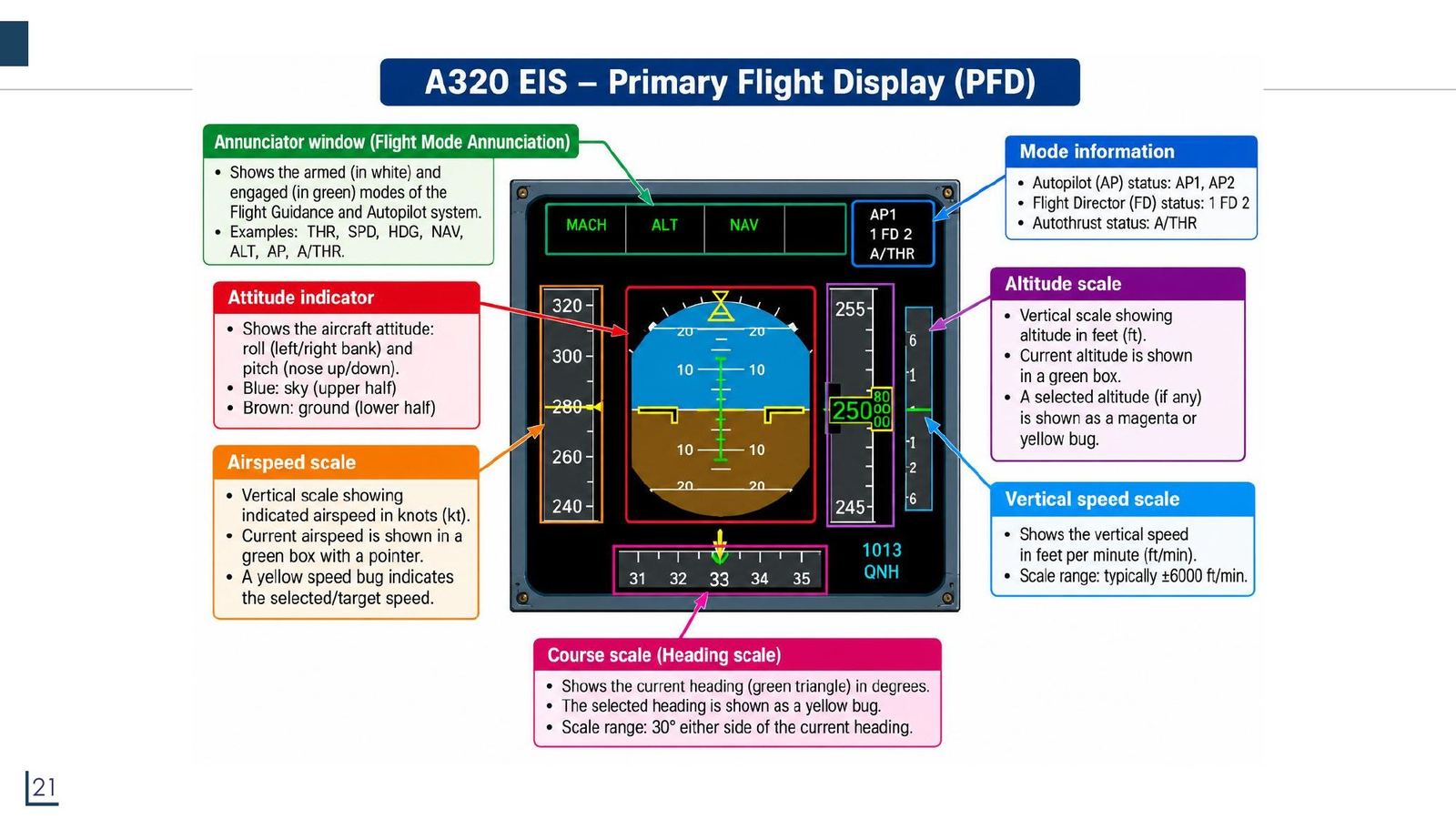
The A320 PFD: reading a flight display
Click the image to enlarge
📖 Explained for complete beginners

The fastest way to learn the PFD is to follow the T layout of the old mechanical dials: speed left, attitude centre, altitude right, heading below. The EFIS keeps those positions so pilots switching aircraft types need not relearn them (Tooley section 1.2 stresses preserving relative positions). Colours also carry meaning: green is active, white is armed, magenta/yellow are selected values.

PART 3/5 · 06

The A320 ND: mode and range selectors

The EFIS (ND) control panel lets you:

  • Choose the display mode: ROSE ILS, ROSE VOR, ROSE NAV, ARC, PLAN.
  • Choose the range: 20, 40, 80, 160, 320 NM (range knob).
  • Turn on extra data: CSTR (constraints), WPT (waypoints), VOR.D, NDB, ARPT (airports); FD (flight director), LS (localiser/glide slope).
  • Set QNH and switch the ND on/off (pull/push knob).

PLAN mode: preview the flight plan around a point, north always up.
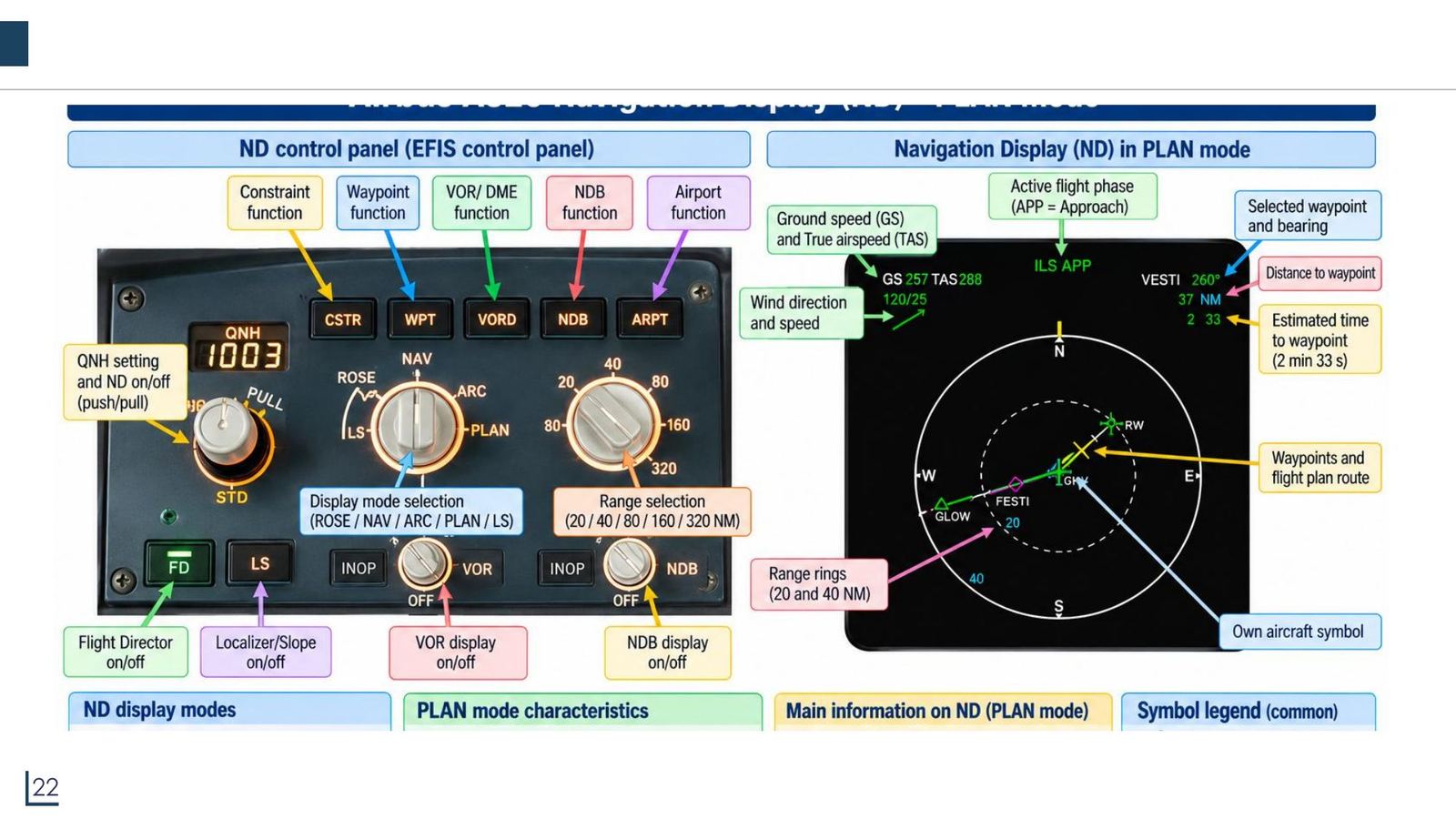
The A320 ND: mode and range selectors
Click the image to enlarge
📖 Explained for complete beginners

This slide is cut off at the bottom (the "ND display modes" and "PLAN mode characteristics" boxes show only their headings), so the PLAN content above comes from the visible part of the slide and the following slides. On the ND image in PLAN mode the pilot sees ground speed (GS) and true airspeed (TAS) at the top left, wind below it, the selected waypoint (VESTI) and its distance on the right, and range rings at 20 and 40 NM.

PART 3/5 · 06

ND: ROSE ILS and ROSE VOR

ROSE ILS (ILS approach): shows the localiser needle (lateral deviation) and the glide slope needle (vertical deviation) around the aircraft symbol; the top right gives the ILS frequency, selected course and runway identifier. Concentric circles give distance (NM).

ROSE VOR: the blue line is the selected course to/from the VOR station and the bearing pointer points to the selected station; the top right gives VOR frequency and course, the bottom gives name and distance for VOR 1 and VOR 2. "OOD" means out of range (station not received).
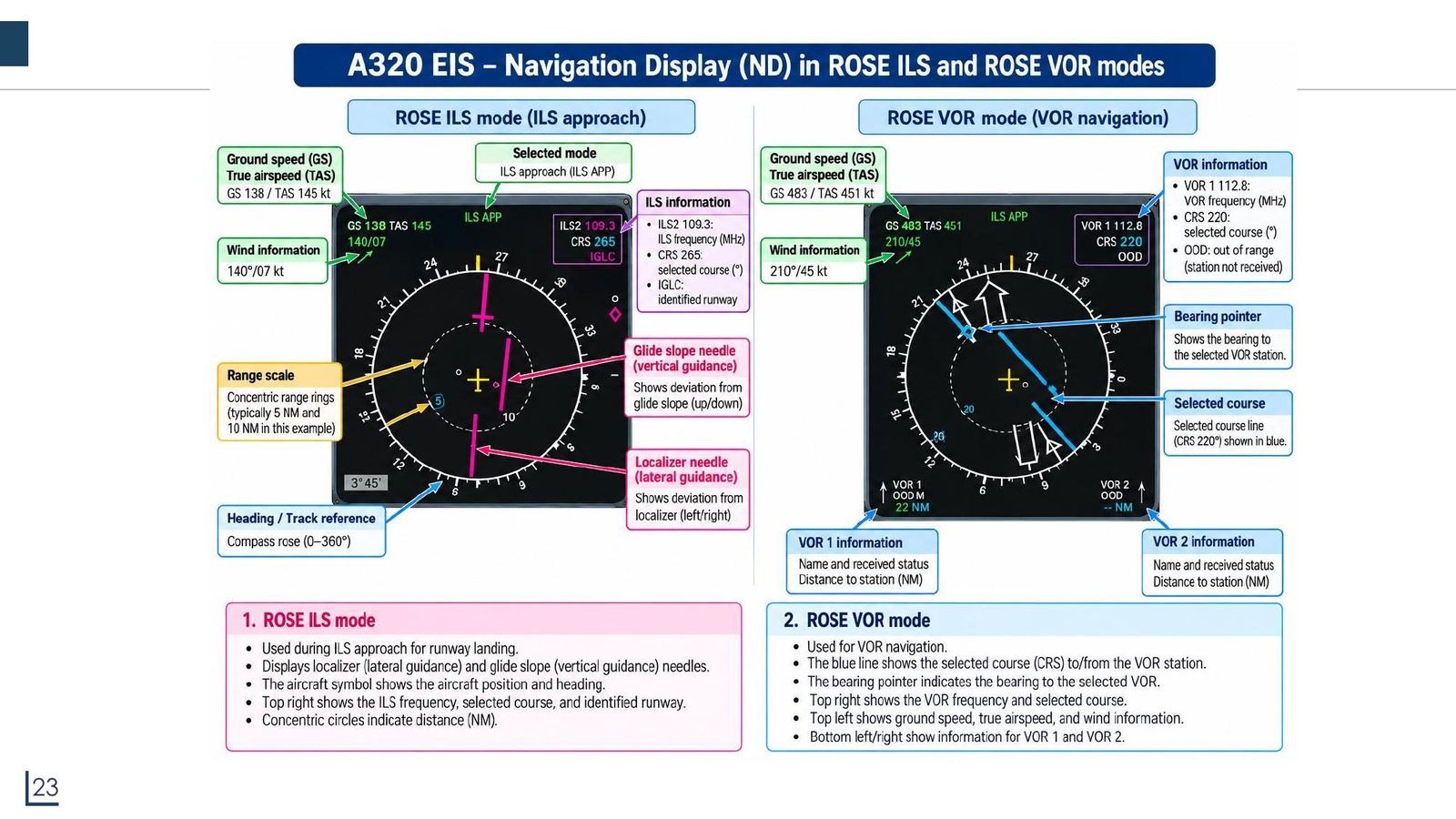
ND: ROSE ILS and ROSE VOR
Click the image to enlarge
📖 Explained for complete beginners

The localiser needle tells whether the aircraft is left or right of the runway centreline, the glide slope needle tells whether it is above or below the glide path. The pilot flies to bring both needles to the centre. On the EADI the same information appears as the "rising runway" and the glide slope pointer (chapter 1 quiz questions 10 and 11).

PART 3/5 · 06

ND: ROSE NAV and ARC NAV

ROSE NAVARC NAV
View360° around the aircraft (plan view)Forward sector, about 80°
Aircraft symbolFixed at the centreFixed at bottom centre
CompassRotates with headingShows only the forward arc
UseEn-route and approachEn-route, when a clearer forward view is needed

Both show: flight plan route (green/magenta), waypoints, VOR/NDB, airports, weather radar echoes, range rings at 20 and 40 NM, radar antenna tilt (TILT).
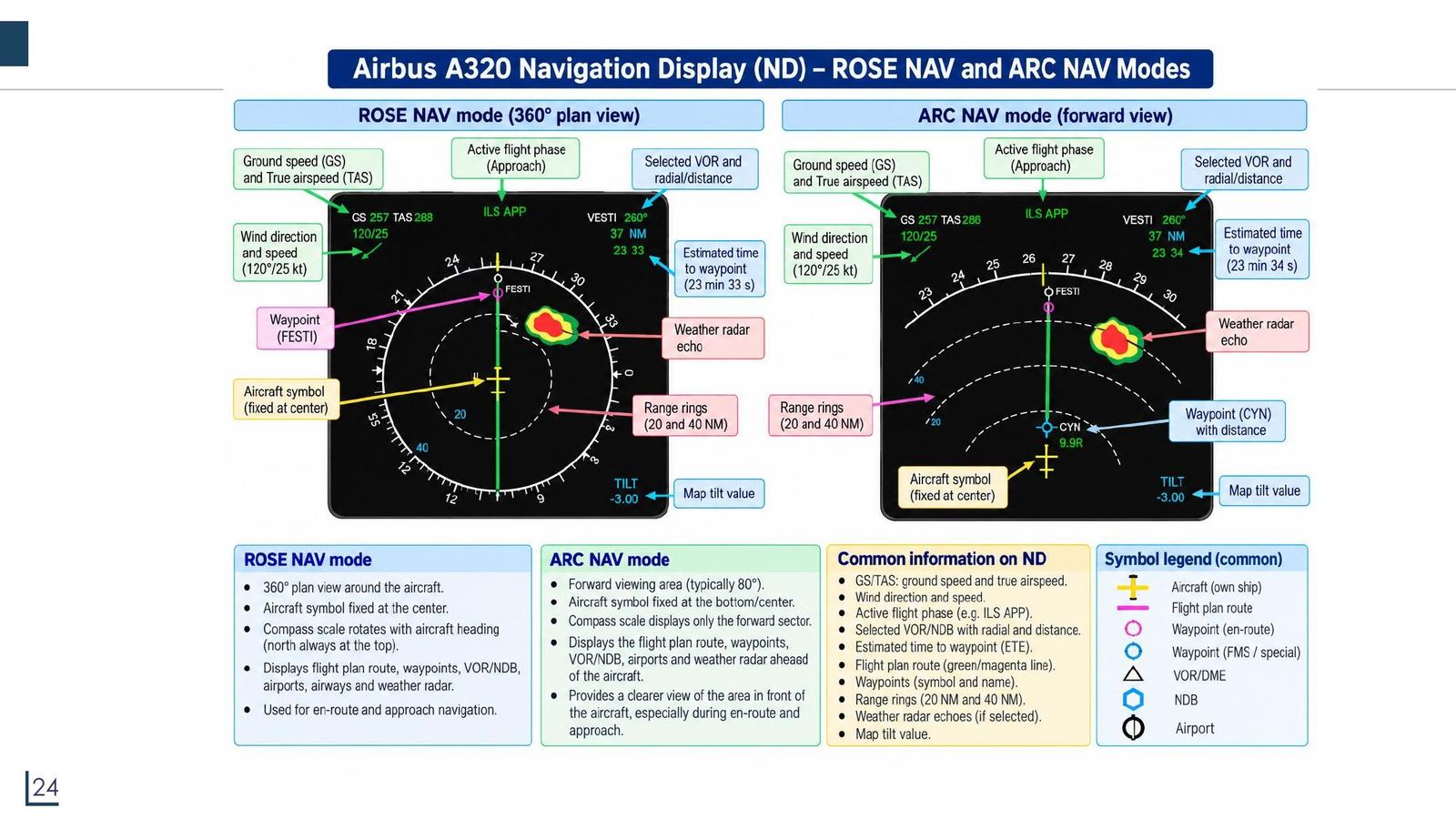
ND: ROSE NAV and ARC NAV
Click the image to enlarge
📖 Explained for complete beginners

About the "time to waypoint" data on the ND: the slide labels "23 33" as an estimated time (23 min 33 s), but at 37 NM and a ground speed of 257 kt the flight time is only about 8.6 minutes (37/257 hour). So "23 33" is more likely an estimated time of arrival (ETA) as UTC clock time. This is a self-check doubt, not confirmed against manufacturer documents.

PART 4/5
04

ECAM and EICAS: monitoring engines and systems

  • Airbus ECAM and Boeing EICAS are two names for the same idea: engine data, systems data and alerts on two screens
  • The upper screen (E/WD) shows engines and warnings; the lower screen (SD) shows system pages (PRESS, ELEC, HYD, FUEL, COND, F/CTL)
  • N1 is fan (low pressure spool) speed, N2 is the high pressure spool speed; EPR, EGT and fuel flow accompany them
  • Each page is read by colour: green normal, amber caution, red limit
PART 4/5 · 06

ECAM and EICAS: two names for one idea

Per Tooley (sections 1.1.6, 1.1.7, 15.3): ECAM (Airbus) and EICAS (Boeing) both use two vertical screens centrally mounted on the panel. The upper (primary) screen shows engine parameters (N1, EGT, N2, fuel flow, flap and slat positions) and alerts; the lower (secondary) screen shows additional information and the consequences of any malfunction.

Benefits: no traditional engine gauges, fewer separate instruments, lower pilot workload, maintenance support and lower operating cost. The lecture adds: ECAM has a central control panel (brightness, page selection, EMER CANC, CLR, STS, RCL).
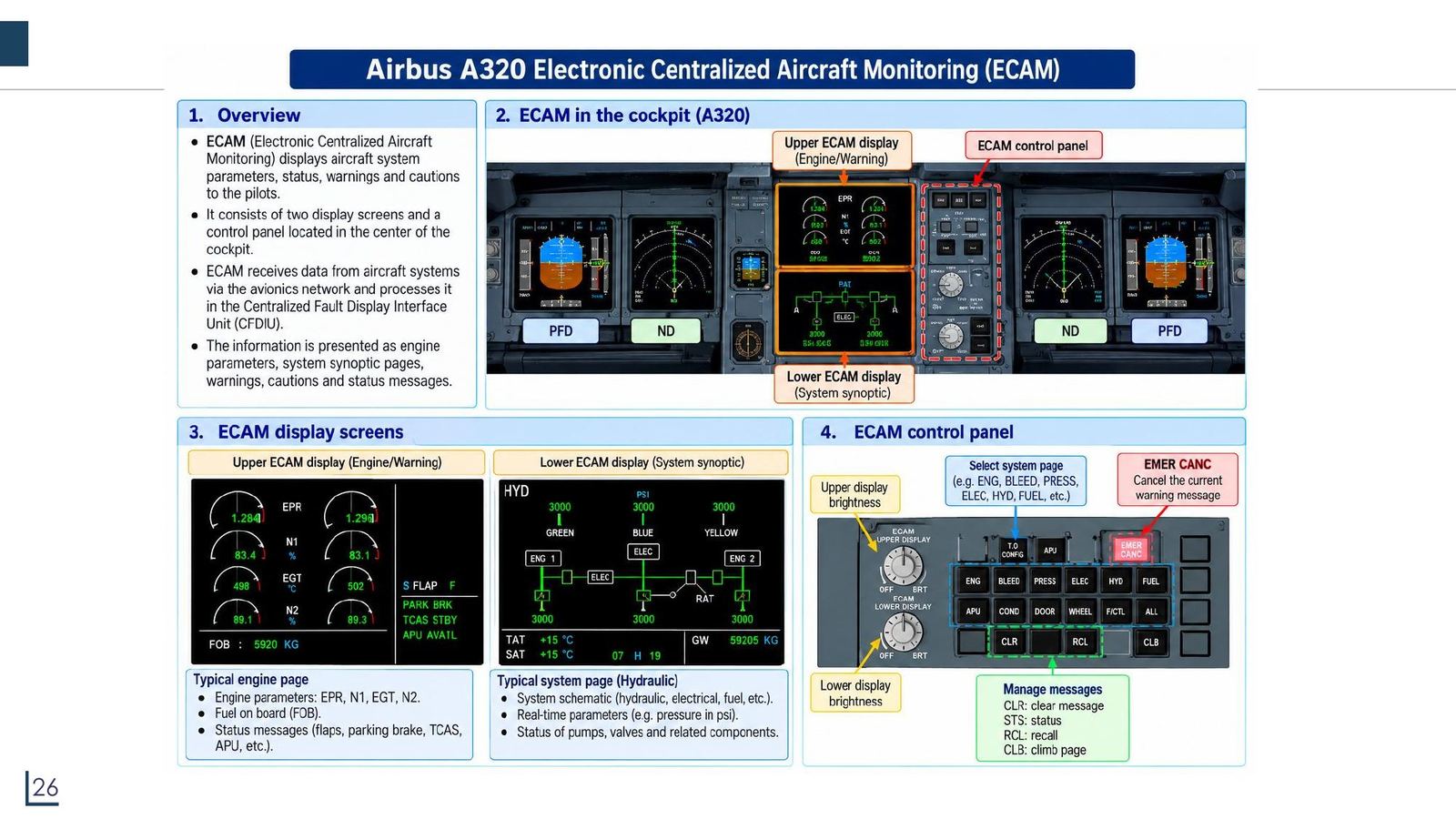
ECAM and EICAS: two names for one idea
Click the image to enlarge
📖 Explained for complete beginners

The two names match the two manufacturers: Airbus uses ECAM, Boeing uses EICAS. Boeing's EICAS also has a DCU (data concentrator unit) that takes data from high- and low-speed ARINC 429 buses, analogue and discrete inputs and gathers it for the screens, the flight data recorder and the lamp driver (the LDU drives up to 120 lamps). If one EICAS display fails, the remaining display shows the primary EICAS data (chapter 15 quiz question 13).

The lecture's ECAM slide says ECAM is "processed in the CFDIU", while the EIS diagram slide has the DMC, FWC and SDAC do this; the two slides describe it slightly differently, so check the manufacturer's maintenance documents when studying in depth.

PART 4/5 · 06

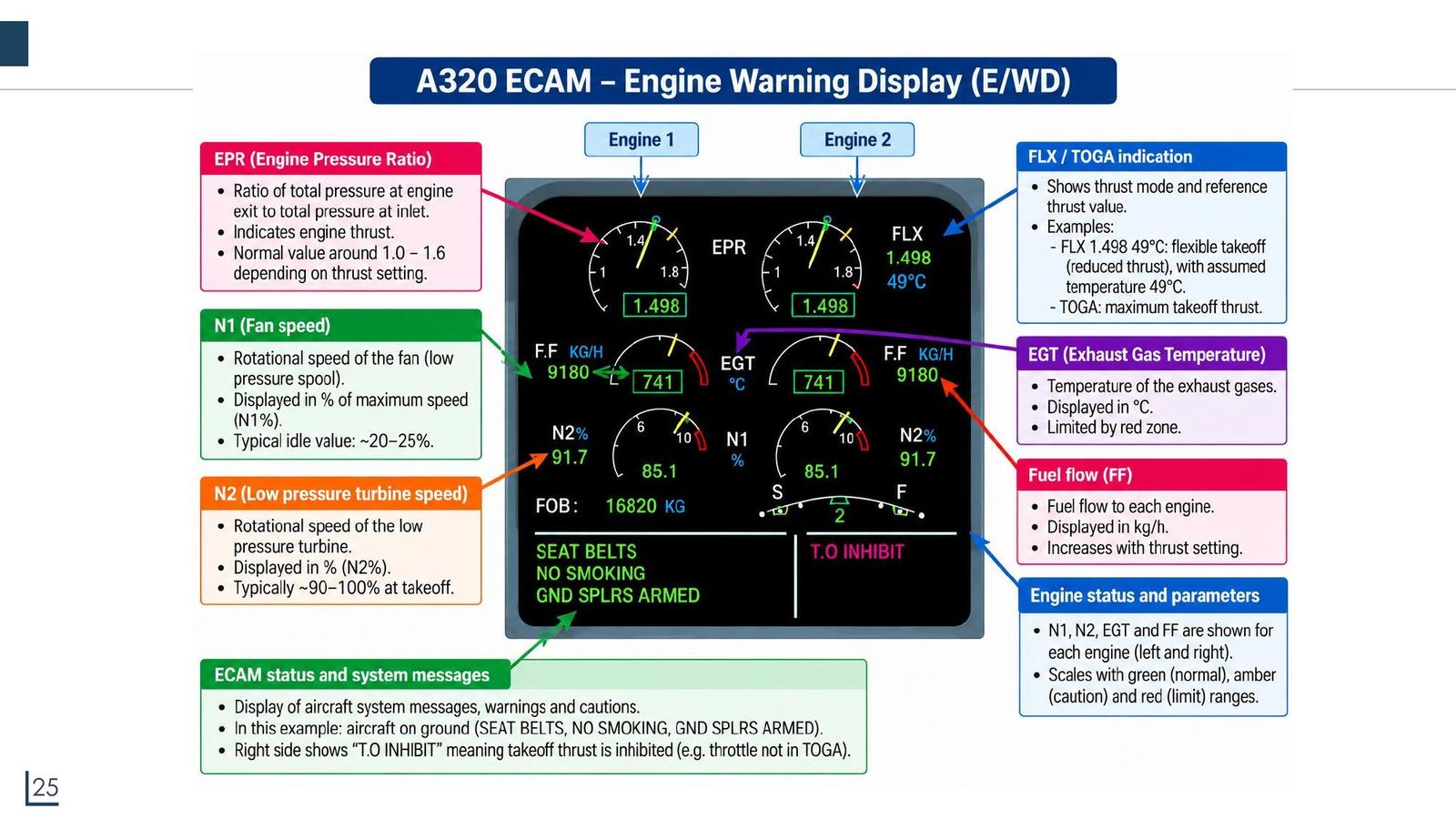
E/WD: engine parameters on the upper screen

SymbolMeaningSlide note
EPREngine pressure ratioIndicates thrust; typical value about 1.0 to 1.6
N1Fan speed (LOW pressure spool)Shown as % of maximum; idle about 20 to 25%
N2HIGH pressure spool speedAbout 90 to 100% at take-off
EGTExhaust gas temperature (°C)Has a red limit zone
F.FFuel flow (kg/h)Rises with thrust
FLX/TOGAThrust modeFLX: reduced take-off thrust with assumed temperature; TOGA: maximum
E/WD: engine parameters on the upper screen
Click the image to enlarge
📖 Explained for complete beginners

Correcting a slide error: the slide calls N2 the "low pressure turbine speed". The same slide calls N1 the low pressure spool, and Tooley (section 1.1.6) writes "N1/fan speed, EGT, N2/high pressure turbine speed", so N2 is the high pressure one. The table above has been corrected to follow Tooley.

Scale colours: green normal, amber caution, red limit. For example "FLX 1.498 49°C" means a reduced-thrust take-off computed with an assumed temperature of 49 °C. The text lines below are ECAM messages (this is an aircraft on the ground: SEAT BELTS, NO SMOKING, GND SPLRS ARMED; T.O INHIBIT means take-off thrust is inhibited).

PART 4/5 · 06

The PRESS page: cabin pressure

The CAB PRESS page shows the cabin pressure maintained by the pressurisation system:

  • ΔP (psi): differential pressure between cabin and outside.
  • V/S (ft/min): rate of change of cabin altitude; UP is pressurising, DN is depressurising.
  • CAB ALT (ft): simulated cabin altitude, what passengers "feel".
  • LDG ELEV: landing airport elevation (AUTO).
  • Valves: INLET (air from engines), EXTRACT (outflow valve regulating pressure), SAFETY (opens automatically on overpressure); PACK 1, 2 supply conditioned air.

Typical cruise values: ΔP about 7 to 8 psi, CAB ALT 0 to 8,000 ft, V/S near 0.
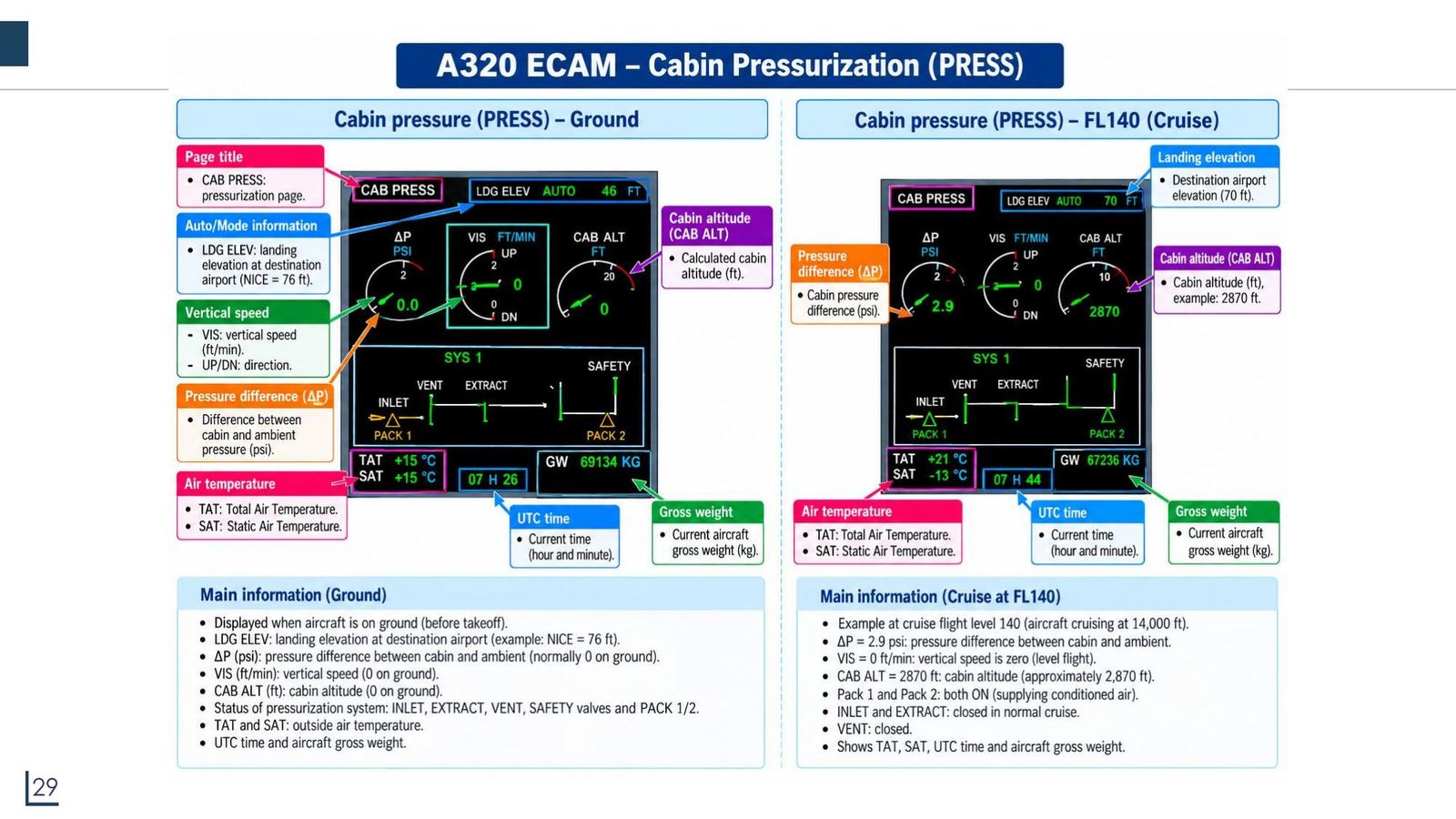
The PRESS page: cabin pressure
Click the image to enlarge
📖 Explained for complete beginners

One number in the slide does not match theory. At FL140 (14,000 ft) in the ISA standard atmosphere the outside pressure is about 8.63 psi; a cabin altitude of 2,870 ft corresponds to about 13.23 psi. Their difference is ΔP ≈ 4.6 psi, whereas the slide shows 2.9 psi. The slide's SAT of −13 °C is exactly ISA at FL140 (15 − 2×14 = −13 °C), so a non-ISA temperature does not explain it. Conclusion: the 2.9 psi ΔP is just an illustrative number, do not memorise it. The calculation is in the notebook (ISA pressure formula).

PART 4/5 · 06

The ELEC page: the electrical power diagram

  • GEN 1, GEN 2: AC generators driven by the engines (through the IDG), feeding the AC 1 and AC 2 buses.
  • TR 1, TR 2 (transformer rectifier): convert AC to DC, feeding DC 1 and DC 2.
  • BAT 1, 2: batteries supplying DC for start-up and backup.
  • AC ESS, DC ESS: essential buses; they can be supplied by the EMER GEN (emergency generator driven by the RAT wind turbine) through the ESS TR when required.
  • IDG 1, 2: display the generator oil temperature.

The slide compares two states: both engines running (normal) and one engine running (a GEN is lost, the corresponding TR has no supply).
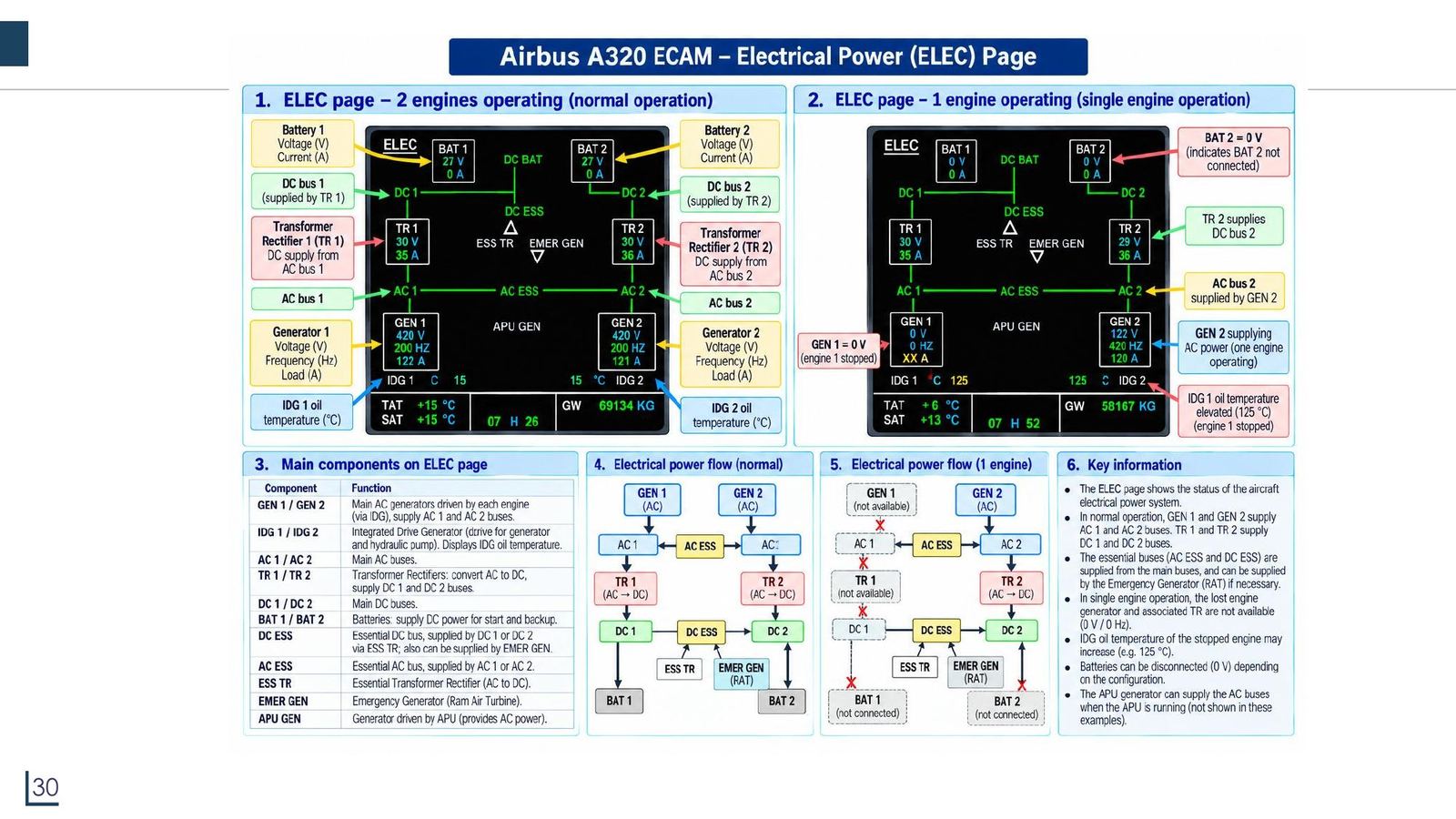
The ELEC page: the electrical power diagram
Click the image to enlarge
📖 Explained for complete beginners

The logical power flow: GEN (AC) → AC bus → TR (AC to DC) → DC bus. When GEN 1 is lost, AC 1, TR 1 and DC 1 also lose supply (showing "0 V, 0 A"), but AC ESS and DC ESS are still fed from the other side.

A doubtful point in the slide: the screen picture draws GEN as "420 V, 200 Hz". Aircraft AC power is 115 V, 400 Hz (Tooley mentions a 115 V AC 400 Hz supply), so those two numbers on the picture are clearly wrong illustrative values.

PART 4/5 · 06

The HYD page: three hydraulic systems

Three systems, GREEN (left), BLUE (centre), YELLOW (right), with a normal pressure of about 3000 psi.

  • Engine-driven pumps (EDP) 1 (green system) and 2 (yellow system): shown green when available.
  • Electric pumps (ELEC): per the slide, for the GREEN and YELLOW systems, shown green when available.
  • RAT (emergency wind turbine) and APU: backup sources; cross-ties link the systems.
  • Pump off: a LO in amber and 0 psi (aircraft on the ground, engines off).
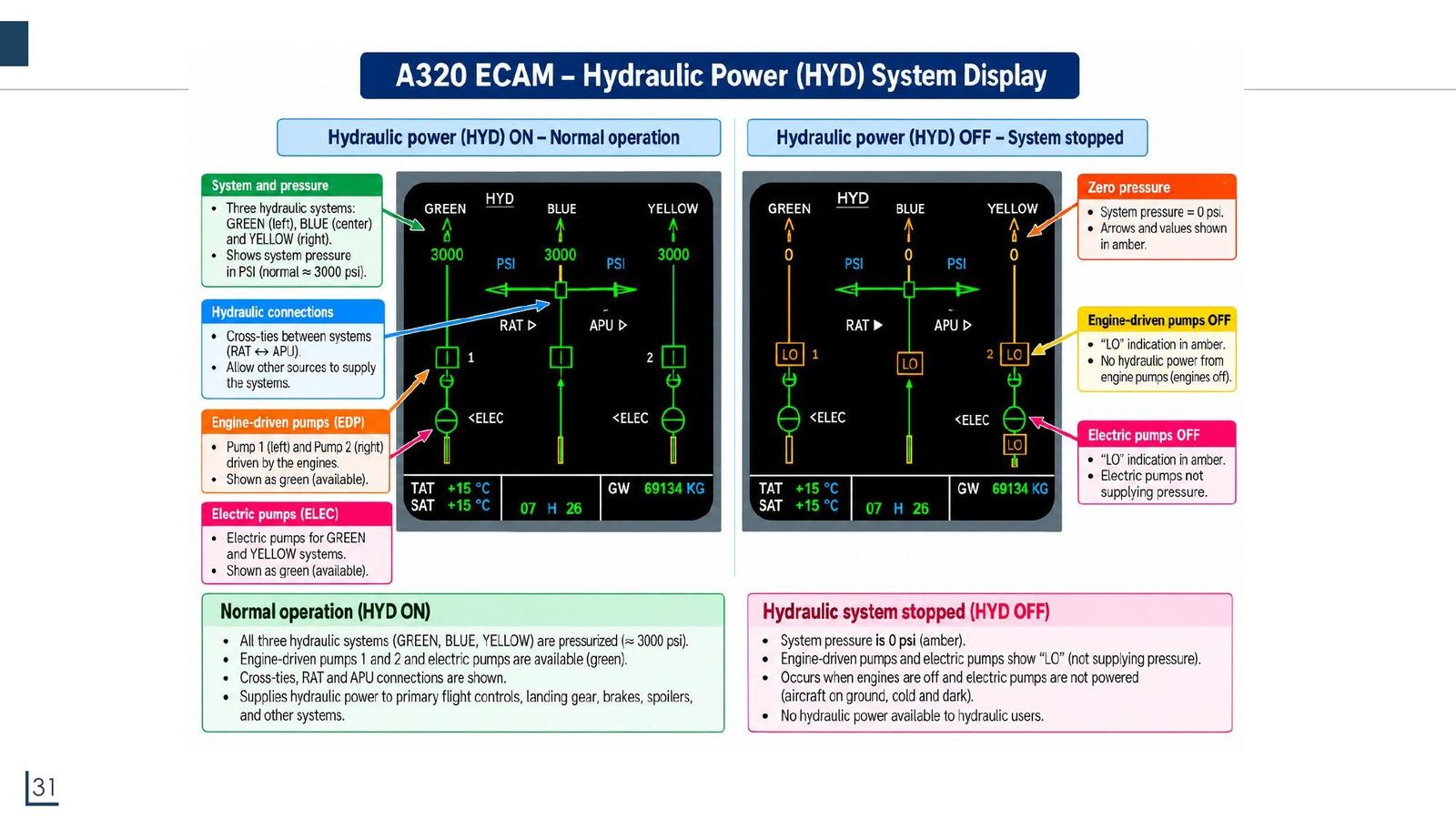
The HYD page: three hydraulic systems
Click the image to enlarge
📖 Explained for complete beginners

The hydraulic systems power the primary flight controls, landing gear, brakes and spoilers. Three independent systems exemplify the redundancy principle from the design requirements. The colour convention is consistent across ECAM: green is normal, amber needs attention, red is a limit.

A note when reading the slide: the pump labels (engine pumps for the left and right systems, electric pumps for GREEN and YELLOW) are how the lecture describes it; check the manufacturer's maintenance documents if you need the real configuration of each system.

PART 4/5 · 06

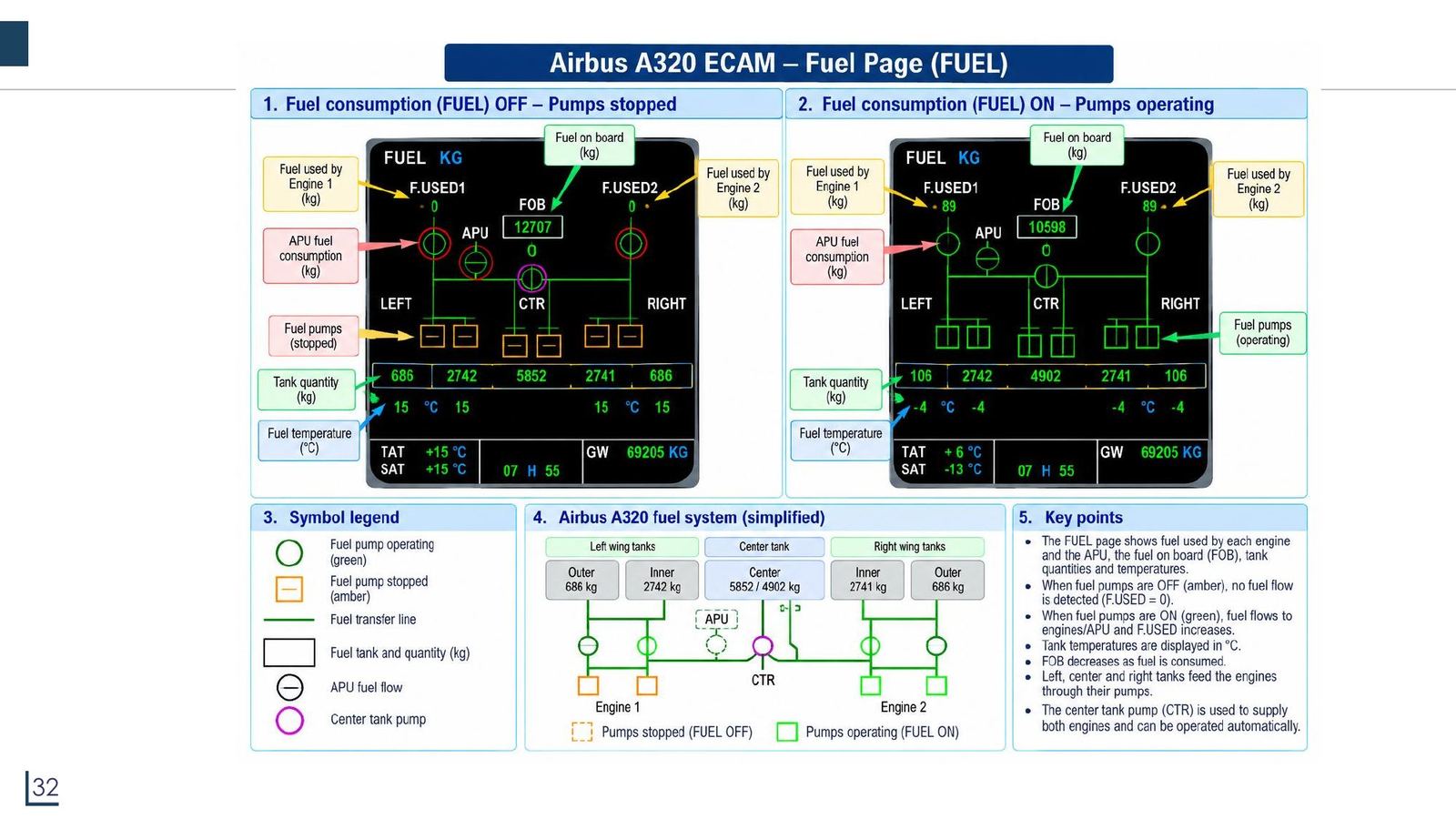
The FUEL page: fuel

The FUEL page shows: fuel used by each engine (F.USED 1, 2), fuel on board (FOB), quantity and temperature of each tank (left outer, left inner, centre, right inner, right outer), pumps (green when running, amber when stopped), APU consumption.

StateTanks (kg)SumFOB shown
Pumps OFF686 + 2742 + 5852 + 2741 + 68612,70712,707
Pumps ON106 + 2742 + 4902 + 2741 + 10610,59710,598
The FUEL page: fuel
Click the image to enlarge
📖 Explained for complete beginners

A check by addition: with the pumps OFF the five tanks add up to exactly 12,707 kg, matching the FOB; with the pumps ON the sum is 10,597 kg while the FOB shows 10,598 kg. The one-kilogram difference is rounding in each tank (each is rounded separately), so it is not a slide error. The notebook rechecks both sums.

A reading rule: with amber (stopped) pumps F.USED stays 0 because no fuel flows; with green (running) pumps F.USED rises and FOB falls steadily.

PART 4/5 · 06

The COND and F/CTL pages

COND (air conditioning): cockpit (CKPT), forward cabin (FWD) and aft cabin (AFT) temperatures in °C; "HOT AIR" bleed from the engines passes through the air conditioning pack, and each zone has a temperature control valve (symbol H).

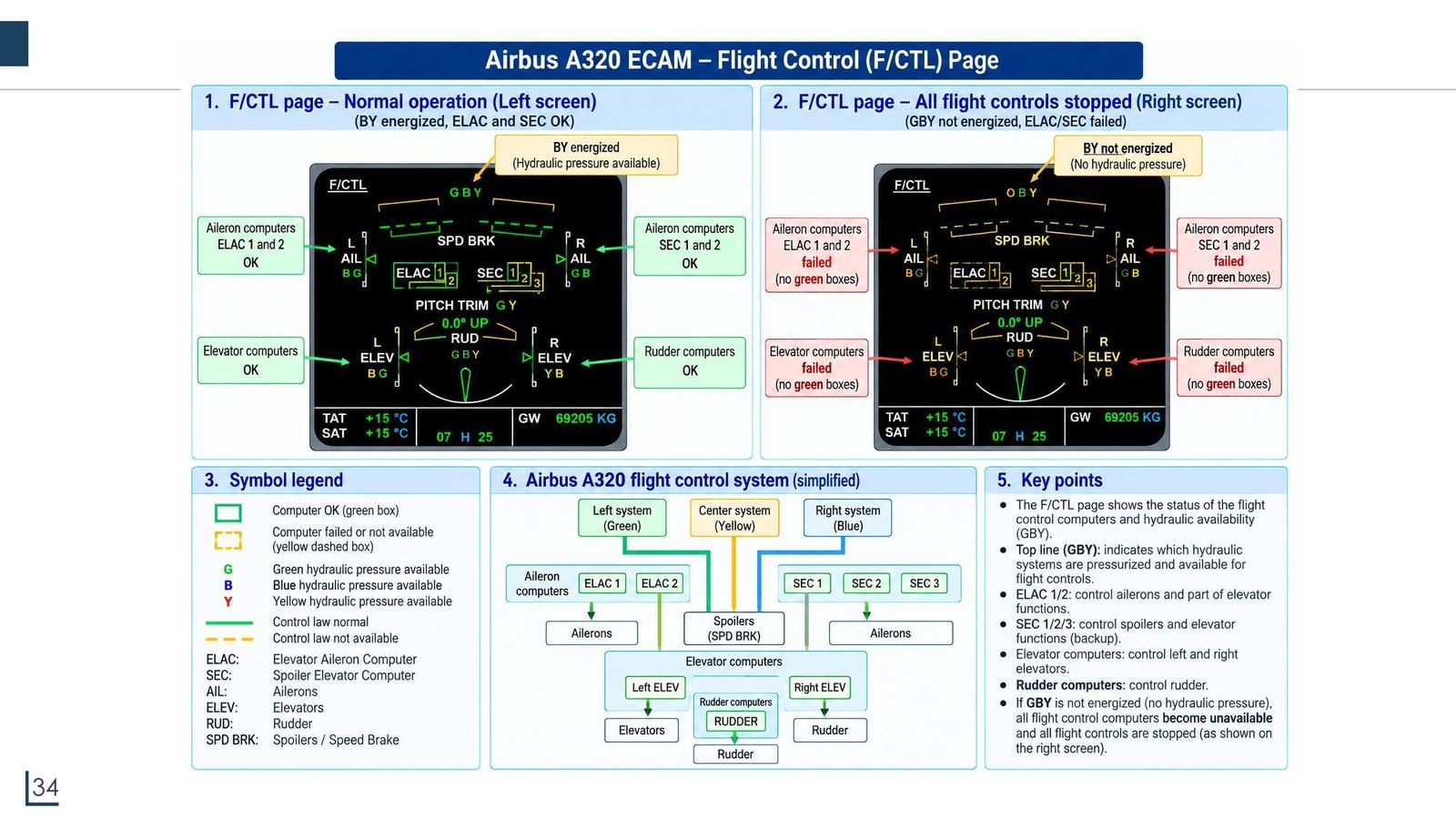
F/CTL (flight controls): status of the control surfaces (spoiler, aileron, elevator, rudder) and of the ELAC (Elevator Aileron Computer) and SEC (Spoiler Elevator Computer) computers, plus hydraulic systems G, B, Y. A green box is an active computer, a dashed amber box is unavailable.
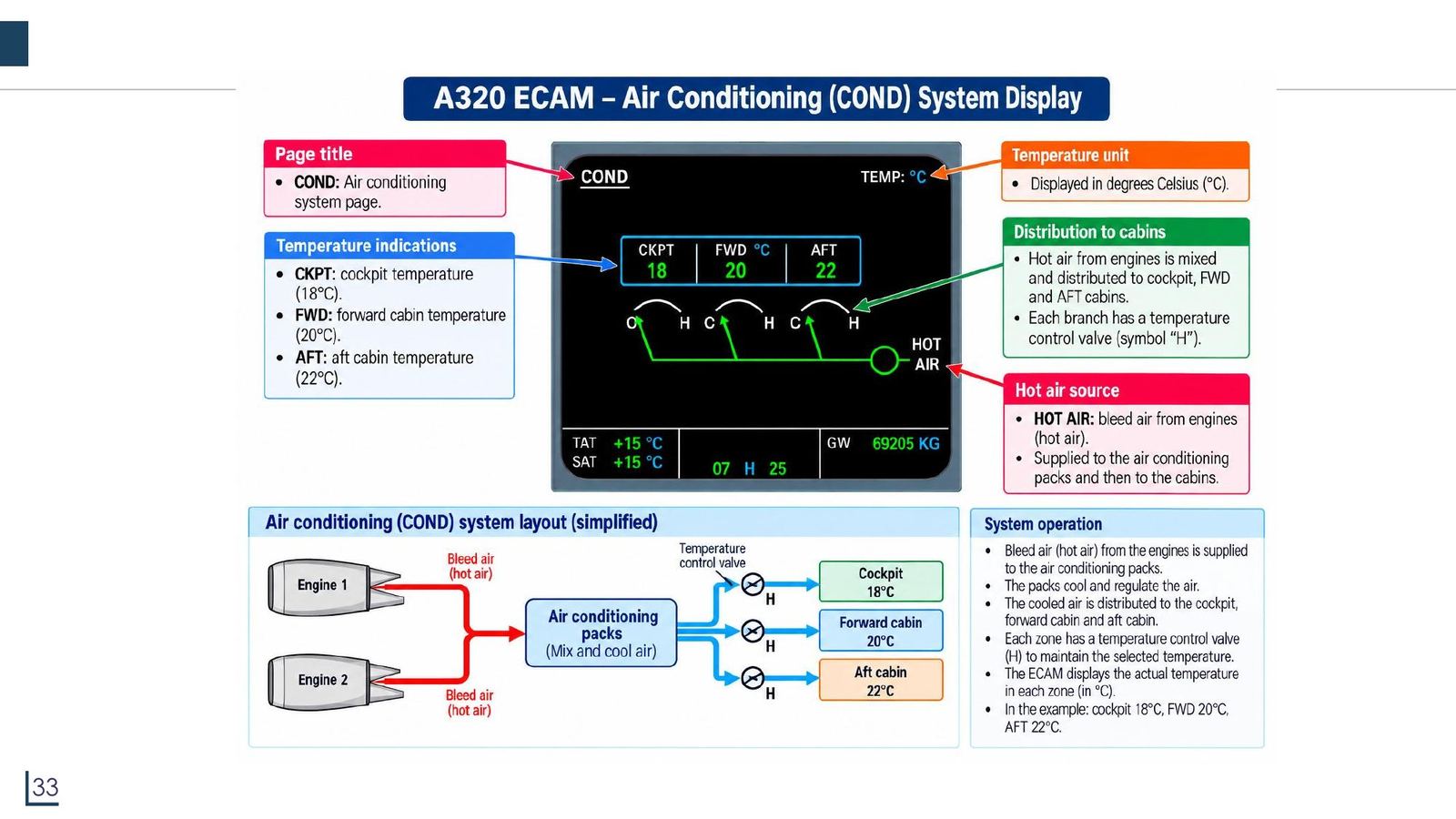
ECAM COND page
The COND and F/CTL pages
Click the image to enlarge
📖 Explained for complete beginners

For F/CTL, two points to remember: green upward arrows on the wing mean spoilers deployed; the left screen with left spoilers deployed means the aircraft is turning left (rolling left), the right screen with right spoilers deployed means turning right. The last slide puts the two states side by side.

Caution: on the "all flight controls stopped" F/CTL slide the lecture concludes that when the GBY hydraulics lose pressure all flight control computers become unavailable. This is a simplified illustrative case; do not take it as a real operating rule.

PART 4/5 · 06

Boeing EICAS and the DCU (Tooley 15.3)

EICAS comprises two large high-resolution colour displays with control panels, two or three DCUs and a lamp driver unit (LDU). The primary EICAS display has a fixed format: speed and temperature, fuel flow and quantity, engine vibration, flap positions, CAS caution messages (colour-coded by importance). The secondary display is page-selectable: landing gear, flaps/trim, APU, cabin pressure/anti-ice, fuel/hydraulics, flight control positions, doors, AC and DC electrics.

EICAS continuously monitors for out-of-tolerance conditions and tells the crew when an event occurs. Airbus's ECAM also warns automatically on malfunctions, but the crew can also select each system manually to view it.

📖 Explained for complete beginners

Two quiz points worth remembering: first, EICAS provides engine parameters and system warnings, not engine data only (chapter 1 Q18); second, for ECAM, failure messages noted by the crew can be followed up by maintenance staff with the system test facility on the cockpit maintenance panel and the BITE on each computer (Tooley 15.10).

PART 5/5
05

Centralised maintenance (CMC) and ACARS

  • The CMC collects fault data from every LRU over ARINC 429; there are two units (one active, one standby) and a time-stamping clock
  • The MCDU, the printer and ACARS are the three ways to get maintenance data out of the CMC
  • ACARS is a VHF data link (129 to 137 MHz) between aircraft and ground carrying OOOI, FMS and maintenance messages
  • Numbers shown on the ECAM pages in the lecture deserve a critical reading: some illustrative values do not match the theory
PART 5/5 · 06

CMC: the centralised maintenance computer and the MCDU

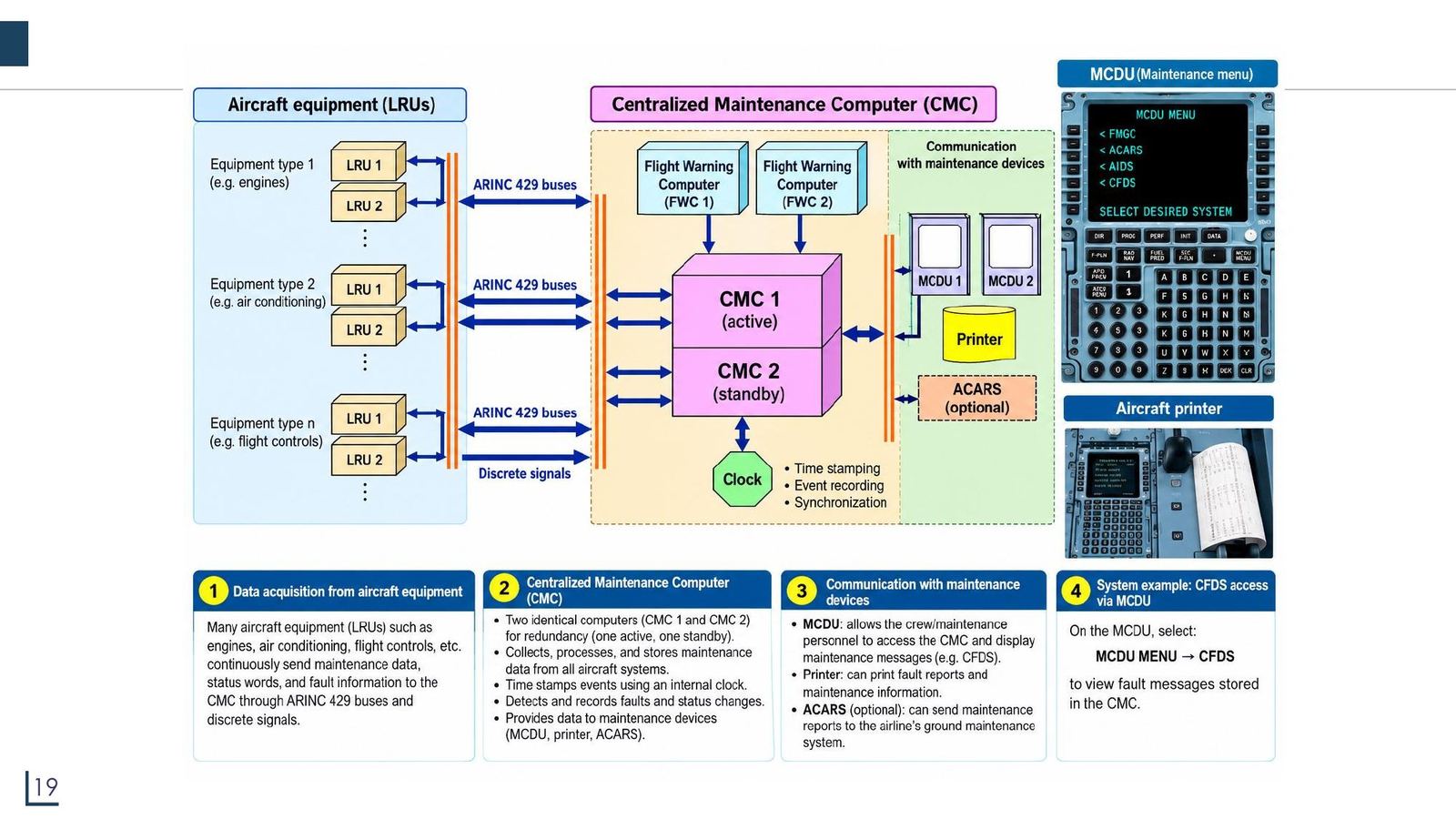
Many LRUs (engines, air conditioning, flight controls...) continuously send maintenance data, status and fault information over ARINC 429 and discrete signals to the CMC.

  • There are two identical CMCs: CMC 1 active, CMC 2 standby.
  • The CMC collects, processes and stores data; time-stamps it with an internal clock; detects and logs faults.
  • Data leaves through the MCDU (viewing messages, for example CFDS), the printer, and ACARS (optional) which sends maintenance reports to the ground.

Access example: on the MCDU choose MCDU MENU → CFDS to view faults stored in the CMC.
CMC: the centralised maintenance computer and the MCDU
Click the image to enlarge
📖 Explained for complete beginners

Picture the CMC as a "maintenance black box", but for ground engineers, not for accident investigation. It is why a technician can plug in at a single point (the MCDU) and see the faults of dozens of systems instead of opening each LRU. Chapter 15 quiz question 8: the CMC provides monitoring and testing both on the ground and in flight.

PART 5/5 · 06

ACARS: the VHF data link between aircraft and ground

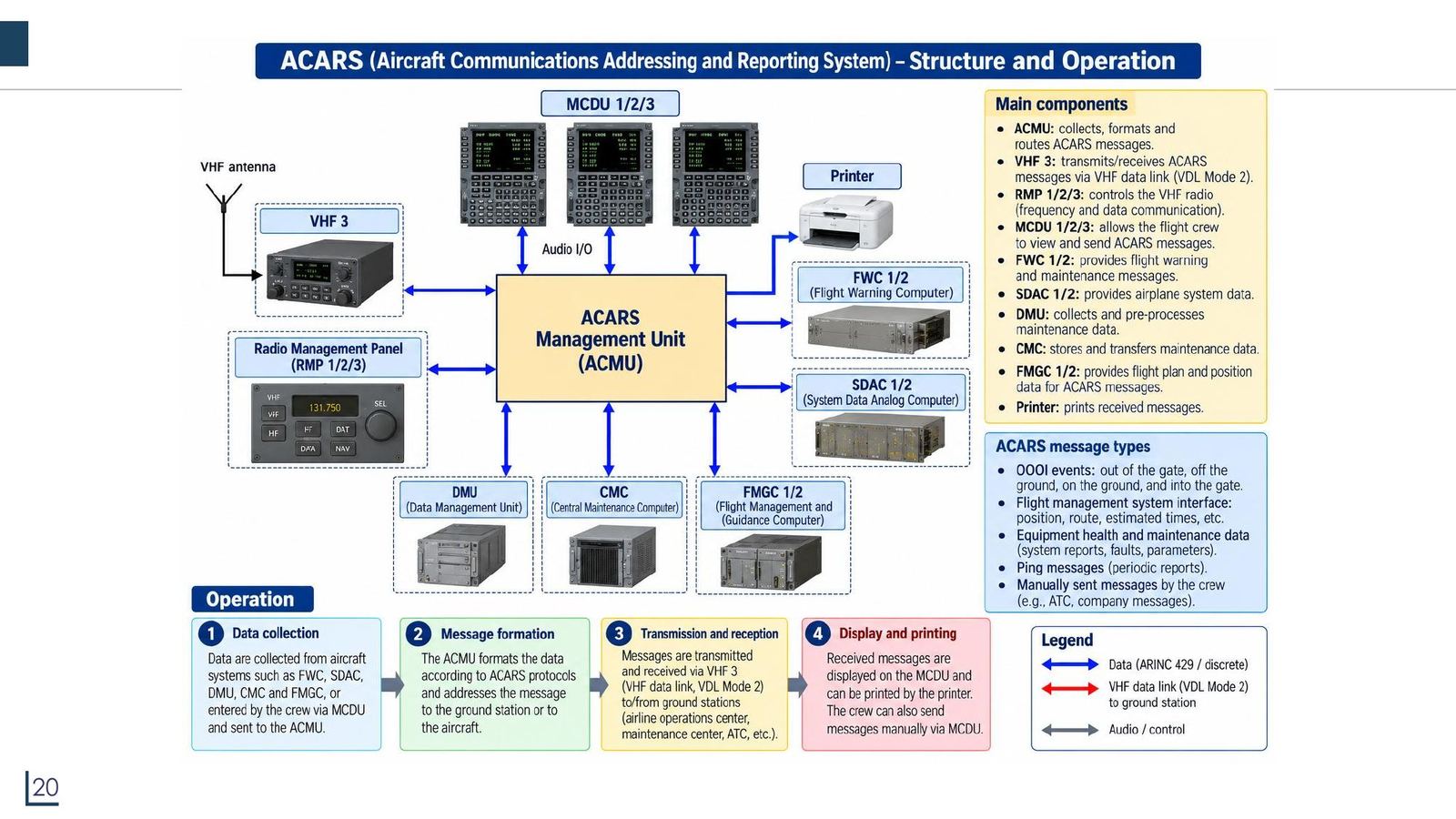
ACARS (Aircraft Communications Addressing and Reporting System) is a digital data link in the VHF band 129 to 137 MHz, letting an airline exchange data with an aircraft without human involvement, much like e-mail. The original standard was ARINC 597, later revised as ARINC 724B.

  • The ACMU (management unit) transmits and receives through VHF 3; the MCDU is the pilot interface; there is a printer.
  • Message types: OOOI (out of the gate, off the ground, on the ground, into the gate), FMS data, equipment health, periodic ping messages, crew-sent manual messages.
  • A message contains: mode, aircraft registration, message label, block id, message number, flight id, content.
ACARS: the VHF data link between aircraft and ground
Click the image to enlarge
📖 Explained for complete beginners

The data rate is low and messages are plain characters, so ACARS replaces much of the mundane HF/VHF voice traffic (passenger loads, departure and arrival reports, fuel, engine performance). All nine channels in Tooley's Table 15.1 lie inside 129 to 137 MHz (rechecked in the notebook).

Two chapter 15 quiz questions: the ACARS standard is defined in ARINC 724 (not 429 or 573); ACARS uses channels in the VHF spectrum; and ACARS is a method of reporting in-flight faults to an engineering and monitoring ground station.

PART 5/5 · 06

Wrap-up: where displays sit in the avionics network

  1. Sensors and computers measure or compute data and send it over a bus (ARINC 429, AFDX) (Module 05).
  2. The DMC/symbol generators turn numbers into images, the FWC adds warnings, the SDAC adds system data.
  3. A CRT or AMLCD screen displays: PFD, ND (EFIS) and E/WD, SD (ECAM).
  4. The pilot reads and operates through the HMI (EFIS panel, ECAM panel, MCDU).
  5. The CMC logs faults; ACARS sends data to the ground.

Under every layer sits digital electronics: BCD to 7-segment codes (Floyd), the character generator ROM (Module 04), decoders and multiplexers (Module 03), serial buses (Module 05).

📖 Explained for complete beginners

If you remember ONE thing from this module: everything the pilot sees on a screen has gone through a chain of digitisation, and each link fails in its own way. In a diagnostic problem, ask in order: is the data source right (the ARINC 429 SSM), is the bus working, did the image generator compute correctly, is the screen displaying correctly.

PART 2-3 · Formula

Invisible pixel size and raster scan frequency

Invisible pixel size and raster scan frequency
h ≈ D · θ (θ = 1' = (1/60)° = 2.91×10⁻⁴ rad; D = 5 m ⇒ h ≈ 1.45 mm)
f_X = N_lines · f_Y (400 lines, f_Y = 100 Hz ⇒ f_X = 40 kHz)
  • hsmallest pixel size the eye cannot yet resolve at distance D
  • Ddistance from the eye to the screen
  • θvisual acuity of the eye, 1 arcminute (1/60 degree), in radians
  • N_linesnumber of scan lines per frame
  • f_Yvertical sawtooth frequency (one frame per period)
  • f_Xhorizontal sawtooth frequency, equal to N_lines times f_Y
📜 history

📜 Theory and historical background

According to Tooley, apart from mechanical indicators, filament lamps and moving-coil meters, the CRT is the oldest display technology still in aircraft use; it still offers very high brightness and a wide viewing angle. The general trend, however, is to replace it with the AMLCD (active matrix liquid crystal display), which is lighter, uses less power, is smaller and more reliable, and lets a complex instrument fit into a single box. The course lecture tells the same story with a cockpit timeline: the 1903 Wright Flyer had no instruments at all; about 10 instruments by 1918; about 600 in the "conventional" cockpit of 1969; CRT screens in the 1990s; and large touch LCD screens on the A350 and Boeing 787 today. For Airbus the sequence is the A310 (1978, first multifunction displays), A320 (1988, six CRT screens), A380 (2007, AMLCD and IMA) and A350 (2015, large touch displays).

🔎 case

🔎 Case study: the path of a speed value from the ADIRU to a PFD pixel on the A320

The ADIRU measures and computes the air data and puts it on an ARINC 429 bus (Module 05). The DMC (Display Management Computer) receives the data and computes the symbols and images for the PFD, ND and ECAM; the FWC adds warnings and the SDAC adds system data. The formatted data travels to the LCDU 725 over a high-speed bus; inside the LCDU, the pre-processing module formats the data, the graphic processor module draws the symbols and text, the LCD assembly (with its driver electronics) switches every pixel and the backlight module provides the light. Each pixel has red, green and blue sub-pixels; with 256 levels per colour channel, one pixel can represent 256³ = 16,777,216 colours, matching the "more than 16 million colours" stated by Tooley (section 11.3.3, verified in the notebook). The pilot reads the result on the PFD speed scale: the number in the green box is the current speed, the yellow bug is the selected speed.

⚠️ warn

⚠️ Common traps (and points in the lecture that need a critical reading)

General trap: mixing up N1 and N2. The lecture's E/WD slide calls N2 the "low pressure turbine speed" while the same slide calls N1 the low pressure spool; Tooley (section 1.1.6) states that N1 is fan speed and N2 is high pressure turbine speed, so N2 must be the high pressure one. The ACARS slide expands SDAC as "System Data Analog Computer" but the EIS diagram slide says "System Data Acquisition Concentrator" (the second matches the function: it acquires data). The ECAM ELEC slide draws generators at "420 V, 200 Hz" while aircraft AC power is 115 V, 400 Hz (Tooley mentions a 115 V AC 400 Hz supply). The PRESS slide at FL140 shows a differential pressure of 2.9 psi together with a cabin altitude of 2,870 ft; in the ISA standard atmosphere the differential pressure should be about 4.6 psi (see notebook), so these are illustrative numbers and should not be memorised. On the ND slide, "23 33" is labelled as time to waypoint (23 min 33 s), yet 37 NM at a ground speed of 257 kt takes only about 8.6 minutes; it is probably an estimated time of arrival (ETA) as a UTC clock time, not yet checked against manufacturer documents, so it is flagged as doubtful. The A310 slide says "EICAS" while Airbus's name, per Tooley, is ECAM. Finally, a genuine printing error in Tooley: the chapter 11 answer key gives question 4 as (a), but the human eye is most sensitive to green light (peak near 550 nm, exactly as question 2 and lecture slide 6 say), so the correct answer is (c); the site uses the correct answer and says so. On the Floyd side, the printed answer to Problem 67, chapter 4 (the circuit in Figure P-19) cannot light segment a for the letter A (checked with the full truth table), so it is not used as the reference answer.

📜 Theory and historical background

According to Tooley, apart from mechanical indicators, filament lamps and moving-coil meters, the CRT is the oldest display technology still in aircraft use; it still offers very high brightness and a wide viewing angle. The general trend, however, is to replace it with the AMLCD (active matrix liquid crystal display), which is lighter, uses less power, is smaller and more reliable, and lets a complex instrument fit into a single box. The course lecture tells the same story with a cockpit timeline: the 1903 Wright Flyer had no instruments at all; about 10 instruments by 1918; about 600 in the "conventional" cockpit of 1969; CRT screens in the 1990s; and large touch LCD screens on the A350 and Boeing 787 today. For Airbus the sequence is the A310 (1978, first multifunction displays), A320 (1988, six CRT screens), A380 (2007, AMLCD and IMA) and A350 (2015, large touch displays).

🔎 Case study: the path of a speed value from the ADIRU to a PFD pixel on the A320

The ADIRU measures and computes the air data and puts it on an ARINC 429 bus (Module 05). The DMC (Display Management Computer) receives the data and computes the symbols and images for the PFD, ND and ECAM; the FWC adds warnings and the SDAC adds system data. The formatted data travels to the LCDU 725 over a high-speed bus; inside the LCDU, the pre-processing module formats the data, the graphic processor module draws the symbols and text, the LCD assembly (with its driver electronics) switches every pixel and the backlight module provides the light. Each pixel has red, green and blue sub-pixels; with 256 levels per colour channel, one pixel can represent 256³ = 16,777,216 colours, matching the "more than 16 million colours" stated by Tooley (section 11.3.3, verified in the notebook). The pilot reads the result on the PFD speed scale: the number in the green box is the current speed, the yellow bug is the selected speed.

⚠️ Common traps (and points in the lecture that need a critical reading)

General trap: mixing up N1 and N2. The lecture's E/WD slide calls N2 the "low pressure turbine speed" while the same slide calls N1 the low pressure spool; Tooley (section 1.1.6) states that N1 is fan speed and N2 is high pressure turbine speed, so N2 must be the high pressure one. The ACARS slide expands SDAC as "System Data Analog Computer" but the EIS diagram slide says "System Data Acquisition Concentrator" (the second matches the function: it acquires data). The ECAM ELEC slide draws generators at "420 V, 200 Hz" while aircraft AC power is 115 V, 400 Hz (Tooley mentions a 115 V AC 400 Hz supply). The PRESS slide at FL140 shows a differential pressure of 2.9 psi together with a cabin altitude of 2,870 ft; in the ISA standard atmosphere the differential pressure should be about 4.6 psi (see notebook), so these are illustrative numbers and should not be memorised. On the ND slide, "23 33" is labelled as time to waypoint (23 min 33 s), yet 37 NM at a ground speed of 257 kt takes only about 8.6 minutes; it is probably an estimated time of arrival (ETA) as a UTC clock time, not yet checked against manufacturer documents, so it is flagged as doubtful. The A310 slide says "EICAS" while Airbus's name, per Tooley, is ECAM. Finally, a genuine printing error in Tooley: the chapter 11 answer key gives question 4 as (a), but the human eye is most sensitive to green light (peak near 550 nm, exactly as question 2 and lecture slide 6 say), so the correct answer is (c); the site uses the correct answer and says so. On the Floyd side, the printed answer to Problem 67, chapter 4 (the circuit in Figure P-19) cannot light segment a for the letter A (checked with the full truth table), so it is not used as the reference answer.

📓 Companion Python notebook

Companion notebook: computes pixel size from visual acuity, raster scan frequencies, 7-segment decoding and Floyd's minimal expressions with sympy, simulates 74HC47 zero suppression, checks the numbers shown on the ECAM slides (fuel, ISA differential pressure, time to waypoint) and re-runs every multiple-choice question that can be computed.

📓 View/download notebook (.ipynb) →

✅ Self-check quiz

Book 1: Mike Tooley, Aircraft Digital Electronic and Computer Systems (end-of-chapter MCQs, independently recomputed to verify each answer)

Book 2: Thomas Floyd, Digital Fundamentals (True/False Quiz + Self-Test, cross-checked against the book’s own printed answer key)

Additional practice questions (AI-authored in the same style, answers self-verified by computation)

✍️ Free-response questions (source: Floyd, Digital Fundamentals)

Thomas L. Floyd, Digital Fundamentals, 11th ed., Chapter 4 · Applied Logic: Seven-Segment Display, Problems 62 to 71 (p.256, PDF 257); answers in the Answers to Odd-Numbered Problems appendix (p.A-6).

All odd Applied Logic problems with printed answers (63, 65, 67, 69) are included. Problems 62, 64, 66 and 68 are even, so the book prints no answers; Problems 70 and 71 are Multisim exercises (they need the simulation files) and are not included. Problem 67 has a printing error in its answer (see the note under the problem).

63. Explain the purpose of the invalid code detector.

Floyd Ch.4 · Problem 63 figure

Consistent with the book's Applied Logic passage (p.246): since the letters A to F are all invalid BCD codes, the display only needs to be enabled when the input code is 1010 to 1111, i.e. when a letter is entered, and must be disabled for the digits 0 to 9.

Floyd Ch.4 · Problem 63

👁️ Show the book's original answer

Floyd Ch.4 · Problem 63

65. Repeat Problem 64 for the logic for segments d through g. (Problem 64: for segment c, how many fewer gates and inverters does it take to implement the minimum SOP expression than the standard SOP expression?)

Floyd Ch.4 · Problem 65 figure

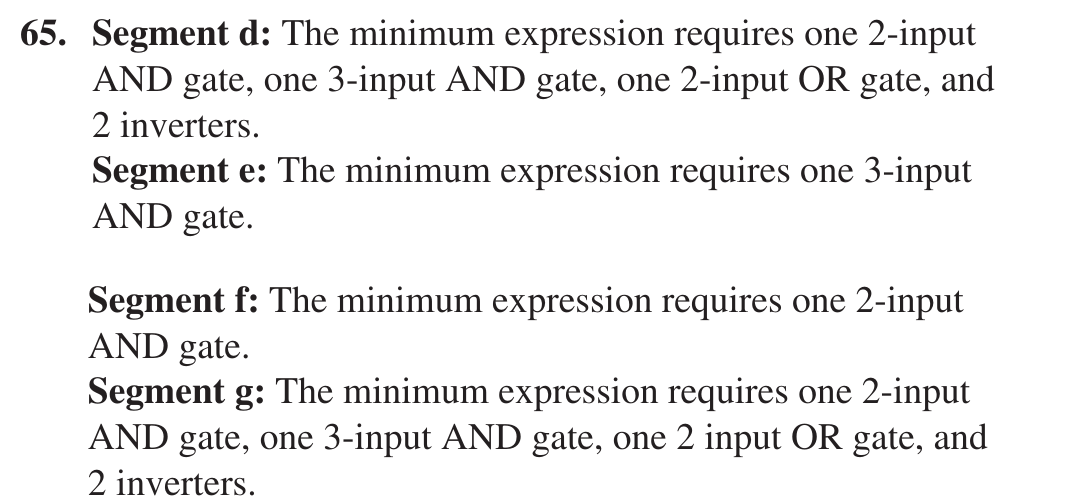
The printed answer lists the hardware of the minimum SOP circuit for each segment. Re-derived with sympy from Table 4-14 (codes 0 to 9 are X, F is all off, a LOW output lights the segment): d = H0H1H2 + H0'H2' (one 3-input AND, one 2-input AND, one 2-input OR, 2 inverters), e = H0H1H2 (one 3-input AND), f = H0H2 (one 2-input AND), g = H0H1H2 + H0'H1' (same as d). Matches the printed answer 100%. Note: the question asks "how many fewer" than the standard SOP while the printed answer only gives the minimum hardware; the "fewer" number depends on the counting convention for the standard SOP, so it is not inferred here.

Floyd Ch.4 · Problem 65

👁️ Show the book's original answer
Floyd Ch.4 · Problem 65

67. Redesign the logic for segment a in the Applied Logic to include the letter F in the display.

Floyd Ch.4 · Problem 67 figure

THE PRINTED ANSWER CONTAINS AN ERROR. The circuit in Figure P-19 gives a = H3·H2'·H1 + H1'·H0. Checking the full truth table for the six letters A, b, C, d, E, F (a = 0 means lit): the printed circuit gives a = 1 at code 1010 (letter A), i.e. segment a of the letter A stays off although Table 4-14 requires it on. The other five codes are correct. The correct minimum expression (sympy, codes 0 to 9 as X) is a = H0·H1' + H0·H2', or equivalently a = H2'·H1·H0 + H2·H1'·H0; both are correct on all six codes. The answer image below is therefore for comparison only, not the reference answer.

Floyd Ch.4 · Problem 67

👁️ Show the book's original answer
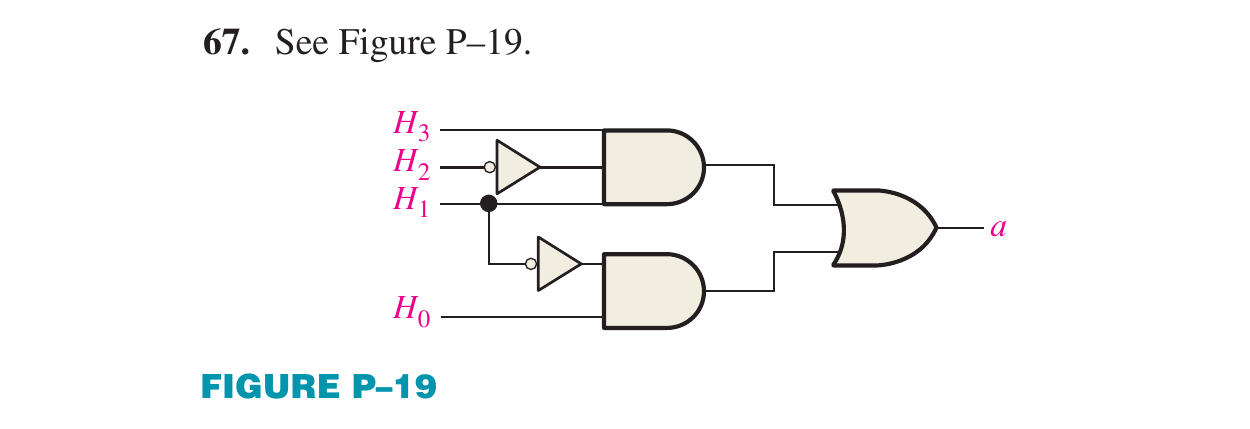
Floyd Ch.4 · Problem 67

69. Design the invalid code detector (a HIGH output enables the display for the letter codes 1010 to 1111, a LOW disables it for the numerical codes 0 to 9).

Floyd Ch.4 · Problem 69 figure

Verified with sympy and the 16-row truth table: X = H3·(H1 + H2) = H3H1 + H3H2 equals 1 exactly for 1010 to 1111 and 0 for 0000 to 1001. The printed circuit in Figure P-20 (an OR of H1, H2 followed by an AND with H3) matches.

Floyd Ch.4 · Problem 69

👁️ Show the book's original answer
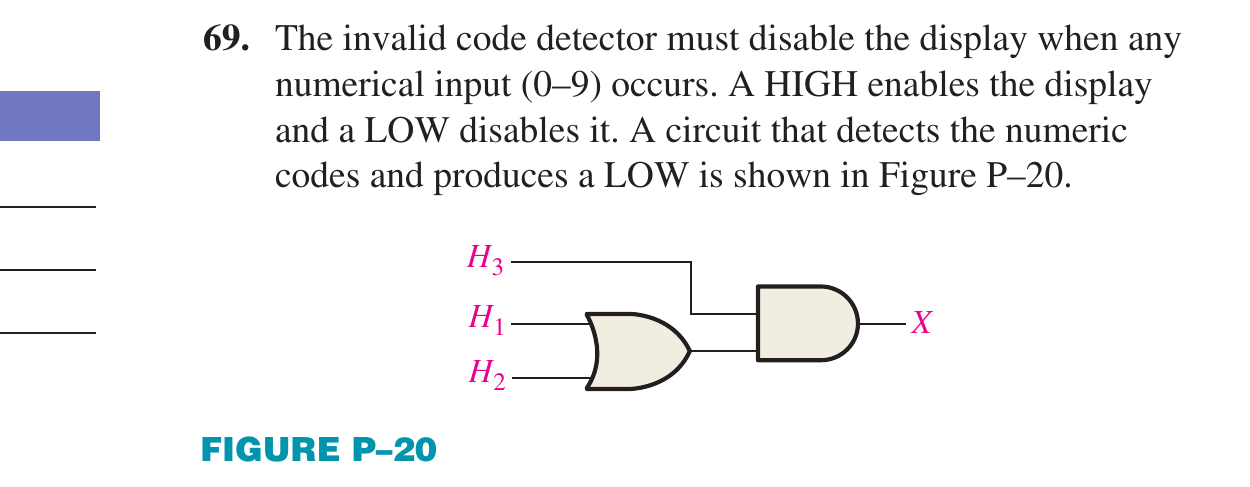
Floyd Ch.4 · Problem 69